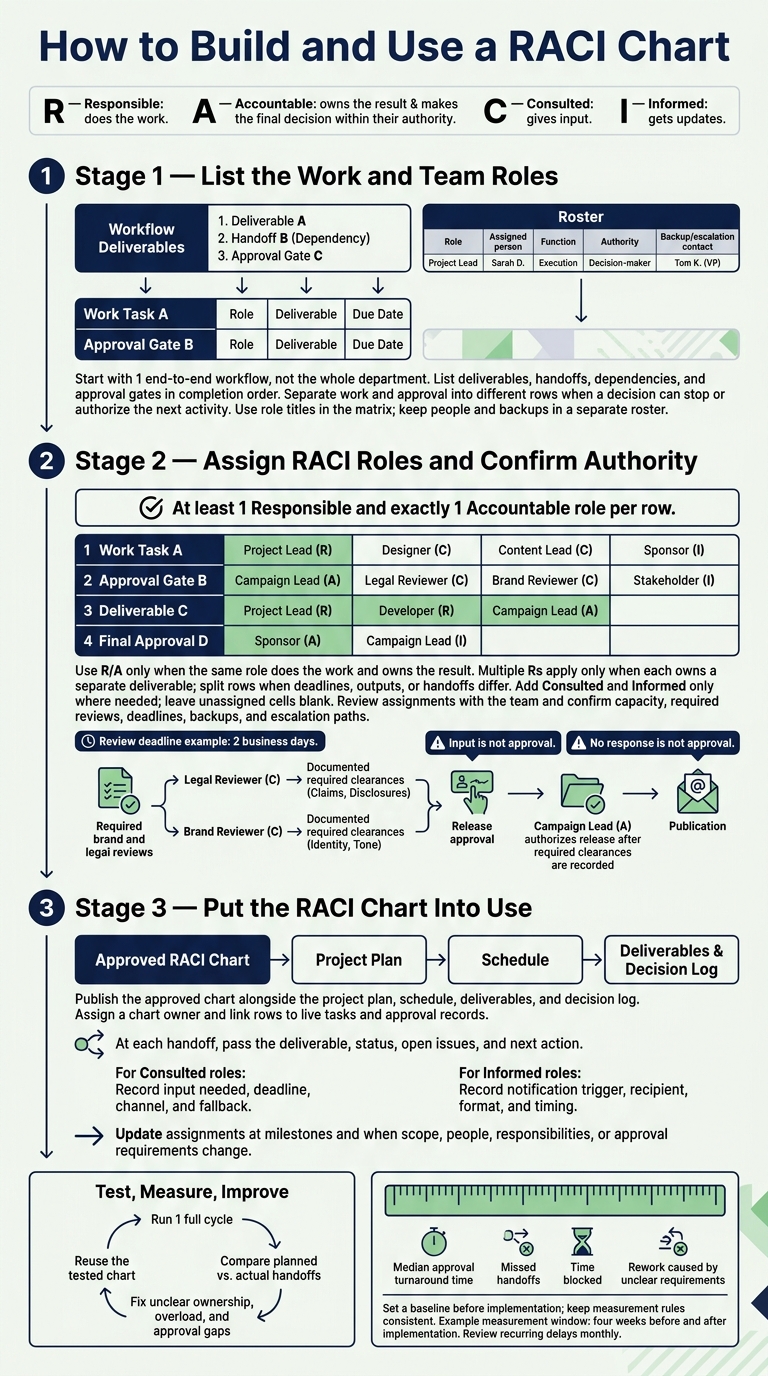
I use a RACI chart to make ownership clear: who does the work, who approves it, who gives input, and who gets updates. Start with 1 workflow, list its tasks and decisions, and assign at least 1 Responsible and exactly 1 Accountable role per row.
Here’s the process I follow:
- Map the work: List deliverables, handoffs, dependencies, and approval gates.
- Confirm authority: Agree on owners, required reviews, deadlines, backups, and escalation paths. Input is not approval.
- Put it to work: Link the chart to live tasks, test 1 full cycle, and track approval time, missed handoffs, and rework.
My rule: <u>no response is not approval</u>. Record required clearances before release, then update the chart when the work or team changes.
How to Build and Use a RACI Chart
How to use the RACI Matrix
sbb-itb-01010c0
Step 1: List the Work and Team Roles
Once scope is defined, map the handoffs, decisions, and owners in the order work happens. Start with one end-to-end workflow, not the whole department. Keep the first chart small enough to review in one session, and leave RACI letters blank until the team agrees on the work, handoffs, and decisions.
Map Tasks, Dependencies, and Decisions
Write rows in completion order. Give work and approval separate rows whenever a decision can stop or authorize the next activity. “Edit, review, and publish” hides several handoffs; each needs its own row.
Map the sequence before assigning roles. Use the structure below, keeping only the steps your workflow needs:
Task or deliverable Expected output Key dependency Decision point Set campaign priorities Proposed goals Business goals and budget Submit for approval Approve priorities Confirmed priorities Proposed goals Authorize brief development Create campaign brief Brief covering audience, message, channels, and timing Confirmed priorities Submit for approval Approve brief Approved production brief Completed brief Authorize production Produce assets Draft copy and design files Approved brief and source material Ready for editing Edit assets Edited, fact-checked files Complete drafts Revisions resolved Conduct brand review Findings and required changes Edited assets and brand standards Ready for brand clearance Approve brand review Documented brand clearance Brand changes resolved Clear brand requirements Conduct required legal review Findings and required disclosures Review-ready assets and applicable requirements Ready for legal clearance Approve legal review Documented legal clearance Required changes resolved Clear legal requirements Approve release Release package and date All required clearances Authorize publication Publish and distribute Live assets and distribution record Publication approval and channel access Confirm release is complete Measure performance Validated data Live assets and tracking setup Data ready for reporting Prepare report Results and recommendations Validated data and agreed metrics Submit for approval Approve report Accepted performance report Completed report Accept findings and next steps
Dependencies are prerequisites, not automatic waiting periods. Brand and legal reviews can run together when neither needs the other's output. Give landing pages, emails, or sales materials separate rows when their handoffs or approval requirements differ.
Create Role Columns and a Team Roster
Use these role columns: Campaign Lead, Content Strategist, Designer, Editor, Brand Reviewer, Legal Reviewer, Marketing Operations, Analytics Lead, and Executive Sponsor.
Put role titles, not individual names, in the matrix so it stays valid when staff change. Include only roles that do the work, approve, advise, or need updates. Don't add entire departments “just in case.”
Keep a separate roster with Role, Assigned person, Function, Authority, and Backup/escalation contact to keep accountability current as staffing changes. Name everyone, including external contributors and informed-only roles. If one person fills several roles, repeat their name for each role.
Step 2: Assign RACI Roles and Confirm Authority
Fill the blank matrix with named owners and approvers.
Assign at Least 1 R and Exactly 1 A per Row
Give every row at least one R and exactly one A. Use R/A only when the same role does the work and owns the result. Leave cells blank where no assignment applies.[7][3][4][8][1]
This worked example covers a U.S. product-launch campaign for a new B2B software feature. Assignments depend on your authority model; this is not a universal template.
Workflow step Campaign Lead Content Strategist Designer Editor Brand Reviewer Legal Reviewer Marketing Operations Analytics Lead Executive Sponsor Define campaign brief and goals A R I C C I C C I Draft positioning and messaging A R C C C C C I Create visual and copy assets A R R C C I C I Review claims and disclosures I R C A I Build and QA landing page A C C C C R C Approve campaign for publication A C I I C C R I Publish sales enablement materials A C C C I R I Review launch results and next steps A C C R I
One A does not mean one role does all the work. The accountable role owns the result and makes sure the required resources and people are available.
Assign multiple Rs only when each role owns a separate deliverable. Split rows when deadlines, outputs, or handoffs differ. Add C and I only where needed to keep the chart clear.
Review Assignments With the Team
Walk through each row with the team. Confirm who does the work, who makes the final decision, whose expertise is needed, and who needs a status update or final result.
Check capacity, dependencies, and review timing. Resolve competing ownership claims before accepting the chart. Remove unnecessary executive reviews, and redistribute work when a role cannot meet its deadlines.
Close Approval Gaps and Define Escalation Rules
Give every unresolved assignment a named decision owner and a deadline. Legal clearance and release approval are separate decisions: the Legal Reviewer clears claims and disclosures, while the Campaign Lead authorizes release after the required clearances are recorded.[6][2]
Confirm that legal reviews happen before public release and that Marketing Operations owns distribution of sales materials. Mark experts without decision authority as C, not A.
Agree on review deadlines, such as 2 business days. Record escalation contacts, absence coverage, and delegation limits beside the matrix. Route unresolved legal or compliance issues to the Legal Reviewer’s manager, budget or launch-date conflicts to the Campaign Lead, and decisions beyond the Campaign Lead’s authority to the Executive Sponsor.
No response is not approval. Confirm the matrix and these rules with participating roles before work begins.[2][5] After team sign-off, use the chart to manage handoffs and escalation in Step 3.
Step 3: Put the RACI Chart Into Use
Make the approved chart part of daily work. Publish the final matrix alongside the project plan, schedule, deliverables, and decision log. Include it in kickoff materials, recurring agendas, and task templates.
Assign a chart owner - usually the project, program, or operations lead - to manage access, answer questions, and handle revisions. Tie the chart to live tasks in your workflow system rather than leaving it in a separate reference file.
Guide Handoffs, Reviews, and Escalation
Use the chart to guide each handoff, review, and escalation. At kickoff, walk the team through every row and its approval path. During planning, identify dependencies, required inputs, and approval gates. Use those details to schedule review requests and final approval.
For Consulted roles, record what input is needed, the deadline, the channel, and the fallback if they miss the deadline. For Informed roles, specify the notification trigger, recipient, format, and timing.
At each handoff, the Responsible owner passes the deliverable, status, open issues, and next action to the next owner. Link each chart row to the brief, review ticket, approval record, or task in your workflow system.
Update the Chart and Track Bottlenecks
Review assignments at every milestone and whenever scope, stakeholders, channels, approval requirements, team membership, or responsibilities change. Log the revision date, affected row, reason, approver, and effective date. Then notify the affected roles.
Check for missing or duplicate ownership, unnecessary consultation or notifications, overloaded teams, and handoffs with no clear recipient. Trace a completed deliverable against the chart to check whether the work followed the assigned roles.
Set a baseline before implementation, then compare results at regular intervals. Track median approval turnaround time, missed handoffs, time blocked, and rework caused by unclear requirements.
For example, a team could compare the four weeks before and after implementation.
Keep measurement rules consistent. Faster approvals mean little if rework increases. Review recurring delays monthly to determine whether they stem from unclear ownership, limited capacity, or unclear acceptance criteria.
Conclusion: Test RACI on 1 Workflow
After the chart is approved, test it on 1 live workflow. Publish it and run 1 full cycle. Check that every row has at least 1 Responsible and exactly 1 Accountable. Use Consulted only for input that could change the result, and Informed only for people who need updates.
Compare the planned handoffs with what happened during that cycle. Fix unclear ownership, overloaded roles, and approval gaps. Then use the tested version as the template for the next workflow.
FAQs
How do we resolve disagreements over accountability?
Set clear rules for making decisions and encourage open communication. When priorities conflict, use agreed-upon criteria, such as their impact on revenue or customer experience, to rank them. Document agreements and review them regularly.
Use a RACI matrix to clarify who owns each task and avoid duplicate work. Steering committees or alliance-management teams can step in before disputes escalate, keeping decisions objective, transparent, and tied to shared goals.
How detailed should our RACI chart be?
A RACI chart should make accountability clear for each task, milestone, and dependency without adding needless complexity. Start with the project’s scope, objectives, and key stakeholders. Spell out who makes decisions and who owns the work to prevent duplicate effort and missed deliverables.
Use the level of detail your project needs, and update the chart as team capacity and workflows change.
How can we keep RACI from adding bureaucracy?
Keep RACI focused on decisions, not documentation. For each task, define only the key roles: who does the work and who approves it. Assign those roles based on expertise and capacity. Use brief, regular check-ins with clear agendas to resolve conflicts early.
Start with a simple roles-and-responsibilities matrix or central log. Keep it alongside project tracking to reduce dependency bottlenecks, and use feedback to refine it without adding complexity.