Choose a social analytics tool by the reporting gap it fills, not the number of metrics it displays. Start with native LinkedIn analytics, then add tools for cross-network reports, competitor tracking, listening, or team workflows. Use website and CRM data to assess conversions and pipeline - engagement alone does not prove revenue.
This comparison covers 12 tools, from basic scheduling to enterprise reporting. It weighs channel coverage, research features, integrations, access controls, and total cost.
Quick Comparison
| Tool | Main use | What to check |
|---|---|---|
| Sprout Social | Reporting and team workflows | Seat costs and paid add-ons |
| Hootsuite | Publishing, engagement, and reporting | Reporting tiers and external connectors |
| Brandwatch | Listening and market research | Separate research and channel-management packages |
| Sprinklr Social | Enterprise reporting and permissions | Modules, setup, and training costs |
| Meltwater | Social listening and PR reporting | Media coverage and package limits |
| Rival IQ | Competitor benchmarking | Competitor limits and exports |
| Socialinsider | Cross-network post comparisons | Network coverage and reporting limits |
| Keyhole | Hashtag and campaign monitoring | LinkedIn support and historical data |
| Metricool | Budget-focused scheduling and analytics | Reporting depth and plan limits |
| Buffer | Simple publishing and basic analytics | Supported reports and integrations |
| Agorapulse | Shared inbox and Social ROI reporting | Approval tiers and attribution settings |
| Looker Studio | Dashboards combining separate data sources | Connector costs and maintenance |
Before choosing, test each finalist through 1 full reporting cycle. Compare its numbers with native reports, check conversion tracking, and calculate the cost of seats, connectors, setup, and reporting work.
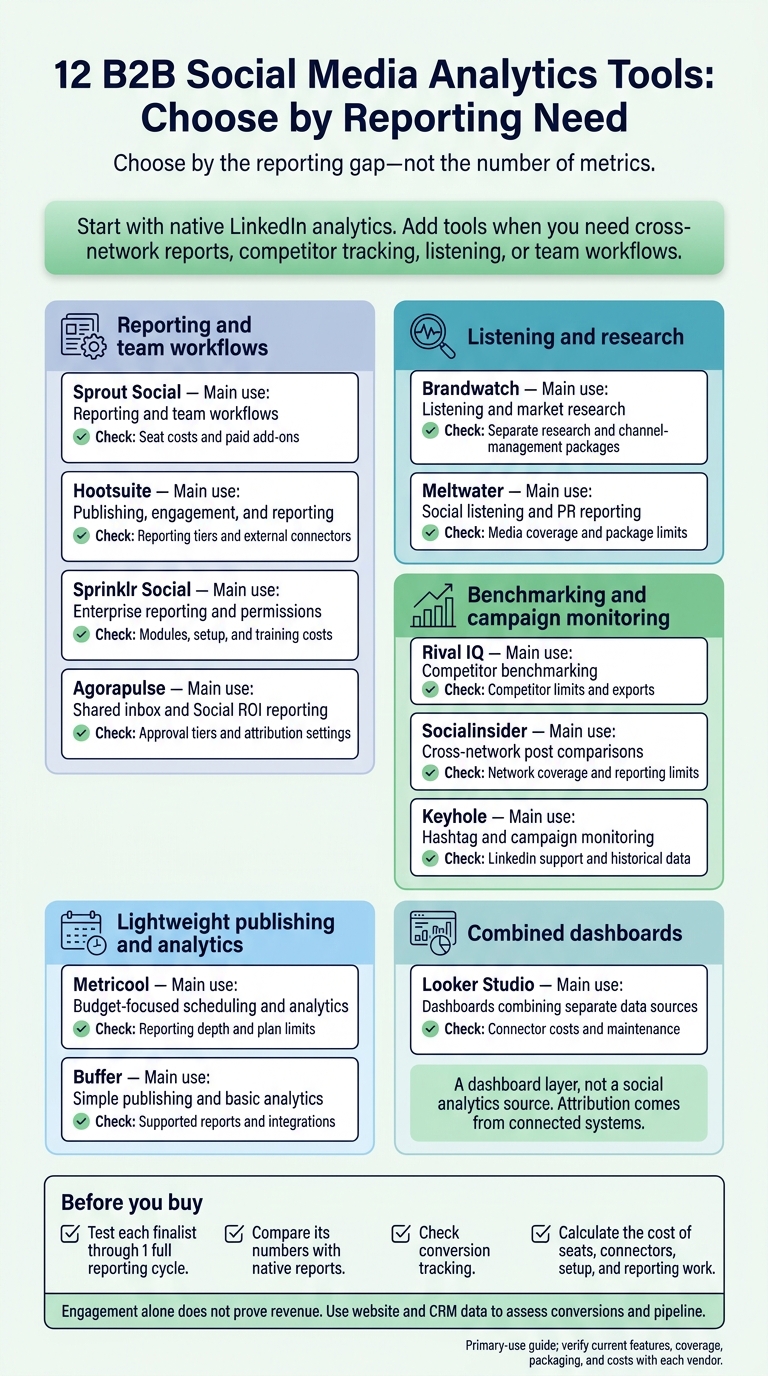
12 B2B Social Media Analytics Tools: Choose by Reporting Need
1. Sprout Social
LinkedIn and Cross-Channel Analytics
Sprout Social pairs detailed reporting with team workflows, making it a fit for B2B teams that need performance reporting and workflow control in one place.[1][2] LinkedIn reporting is its main draw for B2B teams.
Before buying, check the depth of its reporting, the scope of its listening, and the added cost of access controls.
Listening and Competitor Research
Sprout’s listening tools monitor brand mentions and priority topics. Teams should verify that its queries cover the competitors, products, and themes they need to track.[2]
Reporting and Revenue Integrations
Sprout’s CRM integrations help connect social engagement to leads and pipeline signals. But engagement does not equal revenue.[2]
Pricing and Access Controls
Sprout is a premium tool.[2] Total cost depends on seats, listening, reporting access, permissions, and approvals. Its reporting depth comes with higher costs and more setup than lighter schedulers, making it expensive for smaller teams.
The price is easier to justify when teams need detailed reporting and governance rather than basic scheduling.
sbb-itb-01010c0
2. Hootsuite
LinkedIn and Cross-Channel Analytics
Hootsuite brings scheduling, engagement, and analytics for LinkedIn and other networks into 1 place.[1] It suits teams that want to connect engagement data with sales follow-up.[2] Reporting and workflow are its strengths, rather than deep research.
Listening and Competitor Research
Hootsuite supports basic listening but is less specialized in in-depth sentiment and conversation analysis.[1]
Reporting and Revenue Integrations
Hootsuite includes native analytics.[1] To combine social metrics with CRM and revenue data, use external connectors. The platform focuses on day-to-day reporting rather than advanced attribution.
Pricing and Access Controls
Hootsuite is a paid platform. Total costs increase as you add seats and reporting needs grow.[2]
3. Brandwatch
LinkedIn and Cross-Channel Analytics
Brandwatch separates research from channel management. Consumer Intelligence tracks sentiment and web conversations, while Social Media Management handles scheduling, engagement, and owned-channel reporting.[1][2] For LinkedIn reporting and day-to-day channel analytics, use Social Media Management.[2]
Listening and Competitor Research
Consumer Intelligence monitors news, blogs, forums, and public social posts for competitor conversations that can support account research and sales discussions.[1][2] Before buying, test your industry terms in a demo.
Reporting and Revenue Integrations
Use Brandwatch for listening, account research, and social selling, not as your primary revenue attribution tool.[2]
Pricing and Packaging
Brandwatch offers custom enterprise pricing.[2] Ask for separate quotes for Consumer Intelligence and Social Media Management to compare the total cost. Brandwatch is best suited to research-heavy teams; the next tool is a better fit for enterprise workflow and publishing control.
4. Sprinklr Social
LinkedIn and Cross-Channel Analytics
Sprinklr combines enterprise reporting and governance with listening and research. Its enterprise customer experience platform brings analytics from social and digital channels together, serving B2B teams that need consistent reporting across markets and functions.[1]
Listening and Competitor Research
Use Sprinklr’s listening tools to track brand mentions and customer conversations. Check which functions come with Sprinklr Social and which require other Sprinklr products.[1]
Reporting and Revenue Integrations
Sprinklr packages vary by module. Confirm which reporting features your package includes, and distinguish native reporting from add-on implementation or service charges.[1]
Pricing and Access Controls
Sprinklr supports complex enterprise needs and role-based permissions. Get licensing, implementation, training, and admin costs in writing so you can compare the full cost.[1][2]
5. Meltwater
LinkedIn and Cross-Channel Analytics
Meltwater suits B2B teams that need social and PR reporting in one platform. It combines media intelligence, social listening, and earned-media tracking, giving teams a single view of earned and owned media.[1]
Listening and Competitor Research
Meltwater offers broader earned-media, news, blog, and broadcast monitoring than Sprout Social.[1][3] Use that coverage for research and reporting, not pipeline attribution.
Reporting and Revenue Integrations
Keep social engagement metrics separate from media mentions and share of voice. Meltwater can feed CRM analysis, but it isn't a primary revenue attribution tool.[1][3]
Pricing and Access Controls
Confirm pricing, packaging, and access controls directly with the vendor before comparing total costs.
Best Social Media Analytics Tools: Perfect For Agencies🤌
6. Rival IQ
Rival IQ is the leaner option for teams focused on competitor performance rather than broad listening.
LinkedIn and Cross-Channel Analytics
Rival IQ focuses on competitor benchmarking, with engagement and content-performance reports across channels. For a deeper look at your own pages, use your native analytics.[1][2]
Listening and Competitor Research
Use Rival IQ to audit competitors and see which of their content is gaining traction.[1]
Reporting, Pricing, and Access Controls
Rival IQ is a paid platform.[2] Before buying, confirm export formats and integrations. Request a quote that covers pricing, the number of competitors tracked, and permission controls.
7. Socialinsider
LinkedIn and Cross-Channel Analytics
Socialinsider provides analytics and competitor analysis for LinkedIn, TikTok, Instagram, Facebook, X, and YouTube. It focuses on post-level benchmarking and engagement tracking across networks, with deeper cross-network post analysis than Rival IQ’s simpler competitor benchmarking.[1][2]
It suits B2B teams that need side-by-side channel benchmarks more than broad listening.
Listening and Competitor Research
Socialinsider works best for comparing brands’ posts and engagement, rather than tracking broader conversations.[1] For sentiment analysis and broader conversation monitoring, Brandwatch or Meltwater are better fits.[1]
Pricing
Socialinsider is a paid option for teams that need benchmark reporting across multiple networks.[2] Choose it when benchmarking takes priority over conversation monitoring.
8. Keyhole
Keyhole suits teams that need real-time campaign monitoring rather than broad listening. Use it when speed matters more than deep historical analysis.
LinkedIn, Cross-Channel Analytics, and Campaign Monitoring
Keyhole is a real-time social analytics tool for hashtag tracking and campaign monitoring across major social networks.[3][2] Its focus is live campaign conversations and engagement, not full-stack B2B reporting.[2][3]
The supplied sources don’t clarify LinkedIn coverage, historical search depth, or tracking limits. Verify these details before using Keyhole for retrospective reporting.
Reporting and Revenue Integrations
The supplied sources don’t confirm CRM integrations, export formats, or revenue attribution.[2] Request a demo showing the exact fields and outputs your team needs.
Pricing and Access Controls
Current pricing and plan details are unclear in the supplied sources.[2] Before buying, confirm supported networks, tracking volume, historical search depth, export limits, and user permissions.
9. Metricool
Metricool is the budget-friendly option in this group for smaller teams that need basic scheduling and analytics.[2] Its fit depends on whether your team needs low-cost basics or deeper B2B reporting.
LinkedIn and Cross-Channel Analytics
The supplied sources don’t confirm LinkedIn or cross-channel analytics coverage.
Listening and Competitor Research
Competitor tracking and listening features aren’t clearly documented.
Reporting, Integrations, and Pricing
The supplied sources don’t confirm CRM integrations, export options, reporting tiers, pricing, user limits, approval workflows, or role controls. Check these details to compare the total cost with the features your B2B team needs.
10. Buffer
LinkedIn and Cross-Channel Analytics
Buffer is a lighter-weight option for B2B teams that want scheduling and basic analytics in one tool. Its paid analytics and publishing features support cross-channel reporting for LinkedIn, Facebook, Instagram, X, and Pinterest.[2]
Listening and Competitor Research
Buffer handles basic analytics, but it doesn't replace dedicated listening or competitor-intelligence tools.[1][2] It's suited to channel reporting rather than deep market or competitor research.
Reporting and Revenue Integrations
Check exports, integrations, and user permissions before buying if you need deeper reporting. Teams that need custom dashboards and broader attribution will likely outgrow Buffer quickly.
Pricing and Access Controls
Buffer is paid, but plan-level pricing isn't specified here.[2]
11. Agorapulse
LinkedIn and Cross-Channel Analytics
Agorapulse combines a shared inbox with reporting for teams that need collaboration and analytics in one tool. Check which LinkedIn and cross-channel reports are included, along with inbox assignments and approval rules. It’s a better fit for teams that need reporting and workflow control than those focused only on publishing.
Listening and Competitor Research
Check whether Agorapulse covers the competitors and topics you track. The available information doesn’t confirm its listening depth or competitor benchmarking, so request a demo using your own competitors and topics.
Reporting and Revenue Integrations
Agorapulse’s Social ROI features track conversions and revenue through Google Analytics integrations. Verify how the Google Analytics attribution model counts both.
Pricing and Access Controls
Approval workflows and role-based permissions start at Professional. Standard reports export to PDF and CSV. Request a quote in U.S. dollars covering seats, profiles, and reporting features.
12. Looker Studio
Looker Studio brings data from separate publishing, listening, and benchmarking tools into one dashboard, alongside website and CRM data.
Dashboarding LinkedIn and Other Data
Looker Studio is a dashboard layer, not a social analytics source. Connectors such as Supermetrics or Coupler.io bring LinkedIn and other social metrics together with Google Analytics and ad data. [1]
Listening and Competitor Research
Looker Studio has no native listening tools. Use Brandwatch, Meltwater, or Brand24 for listening, and Rival IQ or Socialinsider for competitor data. Looker Studio displays the results from those tools. [1]
Reporting and Revenue Integrations
Connect Salesforce or HubSpot data with website and social metrics to report on social-influenced pipeline. Attribution comes from the connected systems, not Looker Studio itself. [1][2]
Pricing and Access Controls
A free dashboard isn't a free reporting stack. Looker Studio is free, but third-party connectors add cost. It supports sharing with clients and internal teams. [1]
Use it when you already have social data sources and need a single reporting layer, rather than a replacement for those tools. The next section compares tools by feature depth, reporting, and total cost.
Compare Features, Reporting, and Cost
Only documented capabilities appear below. Unverified means the sources don't confirm the feature; a dash means no capability is listed.
| Tool | B2B use case / best-fit team | LinkedIn / cross-network reporting | Listening / benchmarking | Paid analytics / CRM or web integrations | Automated reports / collaboration | Pricing model / starting price |
|---|---|---|---|---|---|---|
| Sprout Social | Social analytics / marketing teams [2] | Unverified | - | Unverified | - | Paid / starting price unverified [2] |
| Hootsuite | Publishing, analytics, and engagement / social teams [1] | Cross-network support; LinkedIn-specific depth unverified [1] | - | Unverified | - | Paid / starting price unverified [2] |
| Brandwatch | Customer conversations and sentiment / research teams [1] | Unverified | Native listening [1] | Unverified | - | Paid / quote-based [1][2] |
| Sprinklr Social | AI-native customer experience / enterprise teams [1] | Unverified | - | Unverified | - | Paid / quote-based [1][2] |
| Meltwater | Media intelligence and listening / PR and communications [1] | Unverified | Native listening [1] | Unverified | - | Paid / quote-based [1][2] |
| Rival IQ | Competitive analytics / benchmarking teams [1][2] | Unverified | Competitive analytics [1] | Unverified | - | Paid / starting price unverified [2] |
| Socialinsider | Social analytics and competitor analysis / content teams [1] | LinkedIn, TikTok, Instagram, Facebook, X, and YouTube [1] | Competitive analysis [1] | Unverified | - | Paid / starting price unverified [2] |
| Keyhole | Mention tracking / campaign teams [2] | Unverified | Mention tracking [2] | Unverified | - | Free entry-level access; paid tiers not detailed [2] |
| Metricool | Budget-friendly analytics tool / details unverified [2] | - | - | - | - | - |
| Buffer | Social analytics / social-selling teams [2] | Unverified | - | Unverified | - | Paid / starting price unverified [2] |
| Agorapulse | Workflow and reporting tool / details unverified | - | - | - | - | - |
| Looker Studio | BI and dashboarding / analytics teams [1] | - | - | - | - | Free core tool; connector costs separate [1] |
These tools serve different jobs. Some focus on listening or benchmarking; others work better as dashboard layers than all-in-one platforms.
Analytics and reporting: Channel coverage varies. The sources don't confirm equal reporting depth across every platform. Ask vendors how social data connects to CRM and web analytics, and whether those connections cost extra.
Listening and benchmarking: Use conversation monitoring for sentiment and market research. Choose competitive analytics to compare content performance. [1][2]
Total cost: Check seats, connected profiles, reporting limits, permissions, and setup or integration fees before comparing prices.
Pros and Cons of Each Tool
Compare each tool’s strengths, trade-offs, and team fit against your workflow needs and total cost.
| Tool | Strongest B2B advantage | Main drawback | Best-fit team |
|---|---|---|---|
| Sprout Social | Deep analytics and listening. [2] | Premium features increase total cost. | Mid-to-large B2B marketing teams. |
| Hootsuite | Strong publishing and scheduling across multiple networks. [1][2] | Advanced analytics require higher tiers. [2] | B2B social teams publishing across multiple networks. |
| Brandwatch | Strong sentiment analysis and conversation tracking. [1] | Steep learning curve for publishing-first teams. | B2B communications and market research teams. |
| Sprinklr Social | Brings enterprise customer experience, marketing, and insights into one platform. [1] | Complex setup and enterprise pricing. | Global enterprise marketing departments. |
| Meltwater | Combines media intelligence with social listening. [1] | Focuses more on PR and communications than engagement. | Enterprise communications and PR teams. |
| Rival IQ | Strong competitor benchmarking. [1][2] | Limited publishing and community management. | B2B competitive intelligence teams. |
| Socialinsider | Competitor benchmarking across LinkedIn, TikTok, and Instagram. [1] | Less breadth than full-suite management tools. | B2B content teams focused on benchmarking. |
| Keyhole | Real-time hashtag and event monitoring. [2] | Too basic for complex B2B attribution. | B2B event marketers and campaign managers. |
| Metricool | Budget-friendly analytics for smaller teams. | Less depth than enterprise listening tools. | Small-to-mid-sized B2B marketing teams. |
| Buffer | Simple scheduling and basic reporting. [2] | Limited competitive intelligence and deep listening. | Lean B2B content teams and solo marketers. |
| Agorapulse | Strong inbox management and Social ROI reporting. | Fewer advanced connectors than BI tools like Looker Studio. | Agencies and in-house teams managing multiple accounts. |
| Looker Studio | Custom dashboards that combine multiple data sources. [1] | A dashboard layer, not a source tool. Requires connectors and maintenance time, with no native publishing or engagement tools. [1] | B2B data analysts and performance marketers. |
Conclusion: Choose by Reporting Needs and Total Cost
Start with native LinkedIn insights. Pay for a tool only when you need cross-network reporting, listening, or team workflows. If native reporting falls short, choose based on the gap you need to close.
Use Sprout Social or Hootsuite for workflow-heavy reporting, Brandwatch for research, Sprinklr Social for global enterprise workflows, and Meltwater for PR and reputation management. For benchmarking, shortlist Rival IQ or Socialinsider. Use Keyhole to track specific campaign conversations.
Smaller teams should test Metricool, Buffer, or Agorapulse against their reporting needs. Consider Looker Studio for combined dashboards only after checking data source support and connector costs.
Test each finalist through 1 full reporting cycle using your own profiles, posts, and tags. Build the executive report you need, reconcile metrics with native insights, and check tracked conversions against your connected tracking sources. Measure time saved rather than judging the tool by dashboard features alone.
Compare total costs across seats, connectors, implementation, and recurring reporting work. Check whether each tool closes a verified reporting gap at a cost you can justify.
FAQs
Which social metrics matter most for long B2B sales cycles?
Focus on metrics that show how buyers move toward a purchase, what signals their intent, and whether your content connects: click-through rates, activity patterns over time, and audience sentiment. Likes, shares, and impressions offer a baseline, but they don't tell the whole story.
Connect social data with your CRM and web analytics to track the path from awareness to conversion. Use behavior analytics and topic forecasting to identify messaging that resonates with target accounts.
Why do tool metrics differ from LinkedIn’s native reports?
Tool metrics can differ because platforms process data differently. Analytics platforms pull data through APIs, then standardize it across networks using their own rules for data cleaning, duplicate removal, time zones, and metric definitions.
They may also use CRM or web analytics data to attribute results and estimate ROI beyond LinkedIn’s native reporting. LinkedIn’s dashboards follow its own reporting logic, which can lead to different totals and calculated KPIs.
How can I avoid double-counting social-influenced leads?
Bring data from your social media platforms, CRM, and web analytics into one place [1]. Before analyzing it, use Extract, Transform, Load (ETL) processes to standardize formats and remove duplicates [1]. Attribution tools such as Rebrandly Analytics or platforms with extensive integrations, like Sprout Social, can help you track customer journeys across channels [1][2].
For help setting up these data pipelines and improving lead tracking, consider consulting with DevriX [3].