Most ERP-CRM projects fail for simple reasons: bad data, unclear ownership, weak sync rules, and poor testing. If I had to boil this article down, I’d say this: pick one system to own each field, clean the data before sync, use APIs, test in staging, and watch errors after launch.
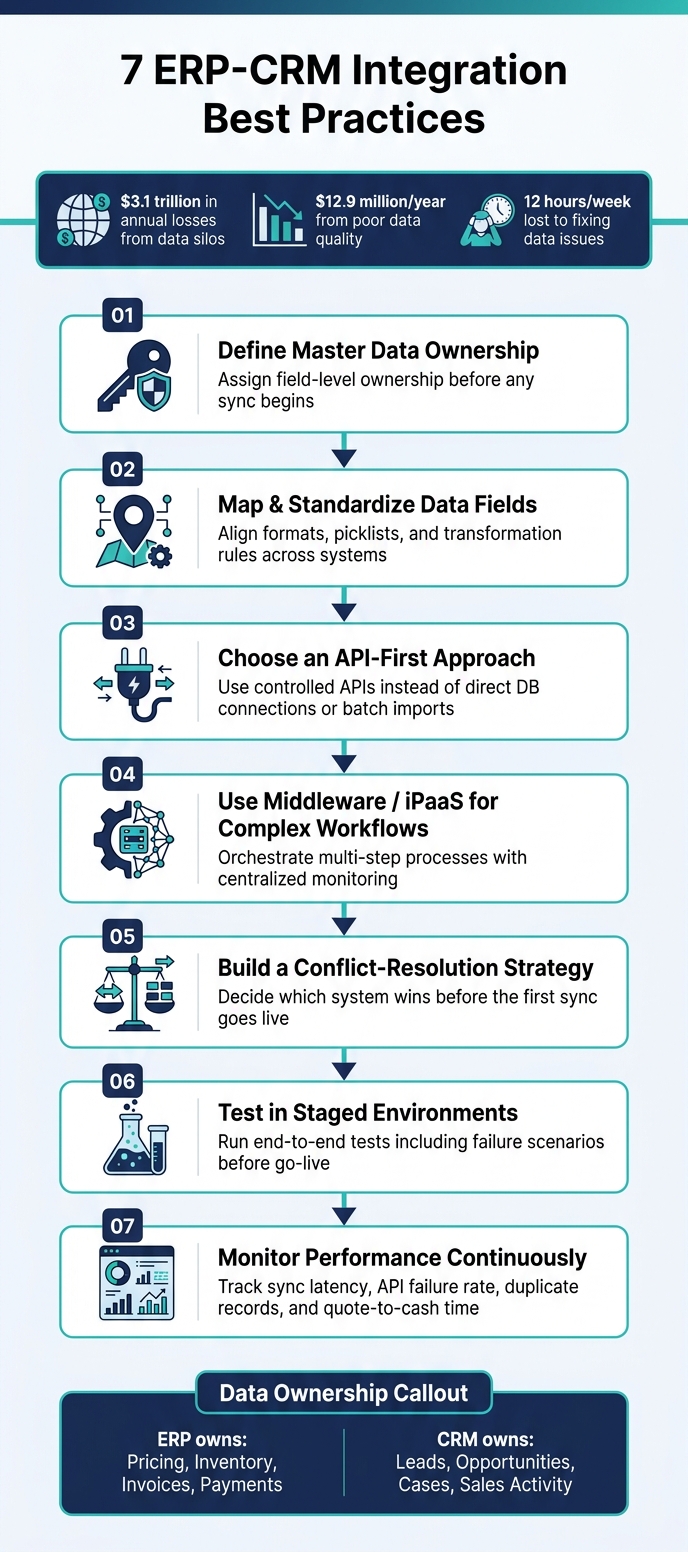
For U.S. B2B teams, that matters fast. The article points to $3.1 trillion in annual losses tied to data silos and $12.9 million per year tied to poor data quality. It also notes that staff can spend about 12 hours a week fixing data issues instead of doing their jobs.
If you want the short version, here it is:
- Set data ownership early - field by field, not just system by system
- Map and standardize shared fields - dates, countries, statuses, currencies
- Use APIs first - avoid direct database links when possible
- Add middleware when workflows span many systems
- Write conflict rules before launch - decide which system wins
- Test in staging - include failed syncs and simultaneous edits
- Monitor after go-live - latency, duplicate records, failed calls, quote-to-cash time
A few points stand out to me:
- The ERP should usually own pricing, inventory, invoices, payments, and tax data
- The CRM should usually own leads, opportunities, sales activity, and cases
- Not every sync needs to be instant - inventory and orders do, history often does not
- A live integration is not “set it and forget it” - it needs rules, reviews, and alerts
Here’s a quick comparison of what each practice is trying to prevent:
| Practice | Main goal | Common problem it prevents |
|---|---|---|
| Define ownership | Stop write conflicts | Two systems overwriting each other |
| Map fields | Keep formats aligned | Bad syncs, bad reports, duplicates |
| Use APIs | Control data movement | Fragile links, security gaps |
| Use middleware | Run multi-step flows | Hard-to-manage custom connections |
| Set conflict rules | Decide which value stays | Older data replacing newer data |
| Test in staging | Catch issues early | Broken automations in production |
| Monitor live performance | Spot failures fast | Duplicate orders, stale pricing, missed invoices |
Bottom line: I’d treat ERP-CRM integration less like a one-time IT project and more like a rules-based data process. Start with one workflow, get ownership and mapping right, then expand.
7 ERP-CRM Integration Best Practices: A Step-by-Step Checklist
How and When to Integrate an ERP with your CRM
sbb-itb-01010c0
Why ERP-CRM Integration Projects Fail Without a Plan
Most ERP-CRM integration projects fail because teams skip planning - not because the software is bad. The usual problems are pretty consistent: unclear data ownership, messy source data, brittle APIs, and weak testing before launch. And in most cases, the trouble starts early, with ownership rules, field mapping, and sync logic.
If nobody decides which system owns a given field, both systems can end up overwriting the same record. That’s a governance issue as much as a technical one. It sounds small on paper, but it creates chaos fast.
Point-to-point integrations add another layer of risk. They create brittle connections between systems and make later changes harder to control. Weak API design makes that even worse. Once the technical layer starts cracking, every team feels it.
As Lars Engbork, CEO of SuperOffice, puts it:
"Integration will amplify data, whether accurate or flawed. Organizations should eliminate duplicates, standardize fields, and align records across systems before proceeding." [2]
The business impact shows up fast. Sales quotes go wrong when pricing or inventory data is stale. Finance gets stuck waiting for manual invoice triggers. Operations can’t forecast demand if pipeline data stays hidden. E-commerce orders, fulfillment, and tracking can drift out of sync. The same failures show up after an acquisition, only compressed, because two full stacks have to talk to each other on a deadline set by the deal. A post-merger integration checklist is worth reading alongside this one, since [what breaks in the first integration sprint] is usually ownership and field mapping rather than the connector.
The seven practices in this article tackle these failure points directly. Think of them as a practical checklist for building an integration that’s accurate on day one and can scale as your business grows. The first step is simple: define ownership, field by field.
1. Define Master Data Ownership Early
Before you sync anything, decide who owns each record and each field. That simple step sets the rules for field-level sync and helps stop messy write conflicts later.
Source-of-Truth Clarity
The ERP should own invoices, payments, inventory, pricing, and tax settings. The CRM should own leads, opportunities, sales activity, and support cases. For financial data, the ERP is the source of truth. [8]
The CRM should control the record while it’s still a lead or an open opportunity. Once the deal is closed, the ERP becomes the owner of the customer record for billing and fulfillment. Finance should give the final sign-off before a new customer is created in the ERP - not sales alone. [4][8]
Write these rules down in a shared ownership matrix before the build starts.
Field Mapping Accuracy
Ownership has to be set at the field level too. If a shipping address lives in both systems, only one system should be allowed to write to it. The other system should read only. [9]
Here’s a simple ownership model to use as a starting point:
| Data Category | System of Record | Primary Users |
|---|---|---|
| Leads & Prospects | CRM | Sales, Marketing |
| Customer master after close | ERP | Finance, Operations |
| Product Catalog & Pricing | ERP | Operations, Finance |
| Inventory Levels | ERP | Operations, Supply Chain |
| Quotes | CRM (creation) / ERP (pricing) | Sales |
| Invoices & Payments | ERP | Finance |
| Cases | CRM | Customer Service |
Get this documented before the build begins. Sales, Finance, Operations, and IT should all approve the ownership matrix before implementation starts. [6][7] Ownership gets harder when the two systems came from 2 different companies. [The M&A integration playbook] covers that version of the problem, including which CRM survives, how to retire duplicate martech licenses, and what to do with the web properties nobody wants to own.
Once ownership is set, map every shared field to one source and one format.
2. Map and Standardize ERP-CRM Data Fields
Once ownership is clear, the next job is making sure the fields line up. If field names, formats, or values don’t match, sync errors pile up fast. You also end up with duplicate records and messy reporting. So after ownership is set, map every shared field to one format and one set of rules.
Poor data quality costs companies an average of $12.9 million per year, and knowledge workers spend about 12 hours a week - roughly 30% of their work week - fixing data instead of doing useful work [10].
Field Mapping Accuracy
Document each shared field, where it starts, where it goes, and what needs to happen to it on the way. Transformation rules spell out how data gets reformatted during sync.
Use the same rules for currency, addresses, and status values. For example, a CRM status of "Prospect" might need to become an ERP status of "Customer" after the first purchase. It’s also smart to standardize picklists and dropdown values across both systems before go-live. That helps stop invalid-value errors during transfer.
Here are some high-value mapping examples with transformation rules:
| CRM Field | ERP Field | Rule | Example |
|---|---|---|---|
| Close Date | Order Date | Reformat date | 07/31/2026 → 2026-07-31 |
| Account Name | Customer Name | Trim whitespace, normalize case | ACME corp → Acme Corp |
| Deal Amount | Order Total | Strip currency symbol, convert to decimal | $12,500 → 12500.00 |
| Stage: "Closed Won" | Status: "Active Customer" | Map status value | Closed Won → Active |
| Billing Country | Ship-To Country | Standardize country code | United States → US |
Start with one mapping set as a pilot. If that works, roll the same logic across the business. After the field mapping is clean, the next step is using an API-first setup to move data between systems with less friction.
3. Choose an API-First Integration Approach
Once field mapping is in place, use an integration layer that keeps ERP and CRM updates accurate in both directions. Direct database connections expose the database itself, and batch-file imports slow sync down. An API-first approach fixes those problems by putting a controlled interface in the middle, with validation and authentication built in. If field ownership is already defined, this layer needs to enforce those rules every time.
APIs give you one controlled path between ERP and CRM. Each request is validated, authenticated, and routed through the same interface. That makes APIs a better fit for live inventory, pricing, and order status than scheduled file imports. Custom code can work, but it gets harder to maintain and scale over time than API-based integration.
At that point, the decision is about speed, security, and how much upkeep your team can handle.
| Feature | API-First | Direct DB Connection | Batch-File Import |
|---|---|---|---|
| Latency | Real-time / Low | Real-time / Low | High (Scheduled) |
| Data Validation | High (via API logic) | Low (Risk of corruption) | Moderate (Post-import) |
| Security | High (OAuth/Encryption) | Low (Exposed database) | Moderate (File encryption) |
| Scalability | High | Low | Moderate |
| Maintenance | Lower | Difficult (System-specific) | Moderate |
API Reliability and Idempotency
Two things separate a solid API integration from a fragile one: reliability and idempotency. Reliability means the integration catches failures and retries them automatically. Idempotency means a duplicate API call won’t create two orders or two customer records. That matters most when the same update shows up twice or a sync fails halfway through.
Before you pick a tool, confirm it supports bi-directional sync, conflict resolution, retry logic, and record-level error logs [4].
4. Use Middleware or iPaaS for Complex Workflows
Use middleware or an iPaaS when API-first integration stops being enough for multi-step workflows that span legacy systems, cloud apps, and third-party tools. It’s the better choice when a single update needs to set off several downstream actions.
A middleware layer cuts the maintenance load with pre-built connectors, low-code or no-code workflow designers, and one place to manage the full integration lifecycle [1][6]. That works well for order routing, approval chains, data enrichment, and other multi-step processes. Direct API connections are fine for controlled point-to-point data exchange. Middleware, by contrast, handles orchestration across many systems at scale, without leaning on custom code that can box you in later [1].
Monitoring and Visibility
One of the biggest advantages of middleware over direct connections is centralized visibility. Point-to-point integrations spread logs across separate systems, which makes it harder to track down where a failed sync broke. iPaaS platforms pull monitoring and transaction tracing into a single dashboard, so teams can spot bottlenecks without digging through system-by-system logs [4][3].
Middleware also applies workflow rules during execution. If an API call fails halfway through a process, the platform can retry it automatically without losing or duplicating transactions [4].
Choose iPaaS only when the license, implementation, maintenance, downtime, and support costs match the workflow complexity you expect.
Once the integration layer is in place, define how each system handles updates and conflict resolution.
5. Build a Clear Sync and Conflict-Resolution Strategy
Once your middleware or iPaaS is set up, decide which system wins when data conflicts. If you skip this step, you invite a sync conflict - one system updates a record, then the other system overwrites it with older or less accurate data.
Source-of-Truth Clarity
For any shared field that both systems can edit, pick one system as the authority before the first sync goes live. After close, the ERP should own billing, shipping, and payment-related account fields.
"Unclear data ownership is a primary cause of integration failure. If a customer's shipping address can be modified in both the eCommerce platform and the ERP, conflicts are inevitable." - Jancy Abraham, Senior Magento Developer, Ceymox [9]
Use the table below as your conflict precedence matrix. If both systems contain a value, the Source of Truth column decides what stays:
| Data Field | Source of Truth | Why |
|---|---|---|
| Leads / Prospects | CRM | Primary tool for early engagement |
| Customer Accounts | ERP | Ensures billing and shipping data matches financial records |
| Pricing / Price Lists | ERP | Linked to contract terms and ledgers |
| Inventory Levels | ERP | Reflects real-time supply chain status |
| Payment Status | ERP | Resides in the accounting/finance module |
| Order Fulfillment | ERP | Manages the actual shipping and invoicing process |
For shared fields like shipping address or phone number, set one rule for each field. For example:
- ERP takes precedence on billing address
- CRM takes precedence on contact phone number
Then bake those precedence rules into staging tests before go-live.
Sync Cadence and Exception Rules
Not every field needs real-time sync. Focus instant updates on the records that can cause problems fast. Inventory levels and order confirmations need immediate updates to avoid overselling.
Other data can run on a batch schedule, such as:
- Product catalogs
- Invoice history
- Shipping tracking
Those updates can run hourly or daily. It also helps to use change-only updates, which sync only modified records instead of pulling the full database each time. That cuts strain on both systems and keeps sync windows tight.
6. Test in Staged Environments Before Go-Live
Use staging to catch broken data flows, failed automations, and access gaps before anything hits production. It’s the safest place to check whether the ownership rules, field mapping, and sync logic you already set up work the way they should.
Start by cleaning the data in staging first. Deduplicate accounts, standardize formats, and align records before go-live. If the data is messy here, it’ll only get worse in production.
Then test the workflows with the most risk from end to end before launch.
Staging Test Coverage
Start with the processes that fail most often:
| Business Process | Validation Goal | Expected Outcome |
|---|---|---|
| Order Creation | Trigger "Closed-Won" status in CRM | Automatic creation of sales order and inventory reservation in ERP [7] |
| Invoicing | Mark order as "Fulfilled" in ERP | Automatic trigger of invoice creation and update of customer record in CRM [7] |
| API Failure | Simulate a failed sync mid-process | Alert fires; retry logic restores the sync without duplicates [4] |
| Simultaneous Edits | Test concurrent edits to the same account | System-of-record rules block overwrites during concurrent edits [4] |
Roll this out with one department first, then expand after edge cases are fixed. [6] Also bring end users into staging. They can tell you fast if the workflow feels simpler or if it adds friction instead. [2]
Once staging passes, move into live monitoring and continuous tuning.
7. Monitor Performance and Improve Continuously
Once the integration is live, keep a close eye on it. The same rules you used in staging should guide what you monitor in production.
Why? Because small failures can turn into expensive problems fast. A failed sync, mapping error, or rate limit issue can break orders, create duplicate records, or leave pricing out of date.
Start with the metrics that give you an early warning - before revenue takes a hit. Focus on three KPI groups: technical health, data quality, and business impact.
On the technical side, watch sync latency and API failure rate. For data quality, track duplicate record count and record error rate. For business impact, measure quote-to-cash time and manual hours saved.
| KPI Category | Metric to Track | Why It Matters |
|---|---|---|
| Technical | Sync Latency | Sales reps need current inventory and pricing data to quote accurately. |
| Technical | API Failure Rate | Catches system instability before it halts order processing. |
| Data Quality | Duplicate Record Count | Protects database integrity and prevents customer-facing confusion. |
| Business | Quote-to-Cash Cycle Time | Directly affects cash flow and operational overhead [7] |
| Business | Admin Hours Saved | Quantifies ROI by measuring reduced manual labor [2][6] |
Monitoring Dashboard and Alerts
Use your iPaaS or middleware dashboard as the main control center. It gives you one place to check data mapping health, failed records, and workflow status across both systems.
Set up automated alerts so your IT team knows the moment a sync record fails - before that failure reaches a customer order or invoice. Audit logs help you trace the exact break point and the cause, whether it's a validation error or a connection timeout.
That same dashboard should also help you review failed retries and spot duplicate risk early.
Track Retries and Idempotency
Track retry success rate for invoices and payments. This helps you confirm that failed retries don't turn into duplicate transactions. Monitor idempotency closely for that reason.
Also watch API call volume against your limits so you don't run into throttling or overage issues.
Architecture and Data Governance at a Glance
Once you've set ownership, mapping, API flow, and testing, the next step is picking an operating model your team can actually support.
Choose the lightest setup that fits your app count, latency needs, and support capacity. More architecture isn't always better. If a simple model does the job, use it.
| Architecture | Best For | Key Tradeoff |
|---|---|---|
| Point-to-Point | Simple, 2-system setups | Hard to scale; maintenance rises and scaling gets harder |
| iPaaS / Middleware | Mid-market to enterprise | Subscription cost; high scalability |
| ESB | Complex, legacy-heavy environments | Powerful but technically demanding |
Architecture decides how data moves. Governance decides who gets to change it.
That split matters. You can have clean API flows and still end up with bad data if nobody owns approvals. So use governance to enforce the ownership rules you've already set. Add approval rules to the governance document. For example, any new customer record created in the CRM should require finance review before it's written into the ERP [8]. Also assign named stewardship owners from sales, finance, and operations, so when a data conflict shows up, the next step is clear.
The table below centers on records that need direct stewardship and approval handling:
| Core Record | Approval Required | Validation Rule | Stewardship Owner |
|---|---|---|---|
| Orders | Sales entry; Ops fulfillment sign-off | Quote-to-order validation of parts and pricing | Sales (Entry) / Ops (Fulfillment) |
| Invoices | Finance only | Must be read-only in CRM; sync from ERP | Finance |
| New Customer (ERP) | Finance review before write | CRM-originated record requires finance approval | Finance / Operations |
Use these rules to check API paths, sync cadence, and test coverage before go-live.
API, Sync, and Testing Checklist
Use this checklist to check security, sync timing, and testing before go-live.
Before go-live, handle the basics first: set up authentication, encryption, role-based access, and audit logs before integration [3]. If you're connecting multiple systems, use an iPaaS or API management platform to manage versioning , often integrating B2B SaaS AI tools to automate these workflows, and keep backward compatibility in place during upgrades [1][4]. Also, confirm each system's API standard, rate limits, and upgrade path before build.
If a transaction fails, send it to a dead-letter queue so your team can reprocess it without stopping the sync [4].
For sync cadence, stick with the ownership rules already set. Use real-time sync for inventory, orders, and payments. Use batch sync for history, catalogs, and reconciliation [1][4][7].
After the sync rules are in place, follow B2B strategies to test them in stages before go-live. Start with data cleansing and a migration rehearsal [2]. Then run unit tests on field mappings and API contract tests to check format and schema alignment. After that, run end-to-end tests on the full quote-to-cash flow [5]. Finish with UAT involving sales, finance, and operations.
Use the table below to keep test coverage consistent.
| Test Type | What It Checks |
|---|---|
| Unit Tests | Individual field mappings and data type alignment |
| API Contract Tests | Format and schema agreement between systems |
| End-to-End Tests | Full transaction flow (e.g., quote-to-cash) |
| Migration Rehearsal | Data cleansing, deduplication, and record accuracy |
| UAT | Workflow usability and cross-functional accuracy |
Resources for Mid-Market Integration Planning
After the checklist, use vetted resources to compare options and close planning gaps. The goal is simple: check your ownership, mapping, and integration choices before you pick a vendor.
The B2B Ecosystem offers directories, AI tools, and advisory resources for ERP-CRM planning. Its directories can help you compare:
- connector depth
- sync capabilities
- deployment models
Use these resources to pressure-test your plan before implementation.
Conclusion
ERP-CRM integration works when you set clear ownership, standardize fields, use APIs, test before launch, and keep watching performance after go-live. But solid execution on its own isn’t enough.
The bigger difference comes from governance. Integration isn’t a one-time project you finish and walk away from. It’s an operating model that needs attention over time. That’s what helps keep the gains in place.
This kind of discipline gives teams more operational clarity. And the payoff is simple: shared visibility across sales, finance, operations, and service.
Start with one workflow. Get ownership and field mapping right. Then scale.
FAQs
How do I choose the system of record?
Set clear data-governance rules so overlapping data doesn’t collide. Decide which platform is the system of record for each entity. In most cases, the CRM owns leads, accounts, and opportunities, while the ERP serves as the source of truth for inventory, invoices, payments, and financial records.
Then use integration tools with deduplication, conflict resolution, and field-level mapping. You should also define sync rules for what happens when both systems are updated at the same time - in plain terms, which system wins for each field.
When should sync be real-time vs. batch?
It comes down to your priorities, transaction volume, and how fast customer data needs to update.
Real-time sync makes sense for medium-to-large businesses or omnichannel setups where instant updates matter - like live inventory or pricing.
Batch sync is a lower-cost option that puts less strain on your systems, which makes it a good fit for smaller setups with moderate volume and limited IT support.
A lot of organizations land on a hybrid model: real-time for urgent data, batch for information that can wait a bit.
What should I test before go-live?
Before go-live, test the integration thoroughly to make sure it’s stable and accurate.
- Run a beta test with a small group to spot usability problems and workflow friction.
- Check data integrity, sync behavior, and field mapping between systems.
- Test in a staging or pre-production environment so you can find and fix issues before launch.