Lower storage costs do not prove lower emissions. I’d start with 1 low-access dataset, measure its storage, electricity use, costs, and retrieval times, then test whether to delete, tier, or migrate it.
These 4 cases show the options - and the gaps in what was measured:
- Carlsberg: An estimated 55 TB archived across its SAP systems and more than €2 million in reported project savings, but no verified emissions reduction.
- Danish Meteorological Institute: Storage tiering with lower reported tape costs per petabyte, but no quantified energy savings or retrieval times.
- Unnamed advertising agency: A move from local tape hardware to cloud storage, without measured power savings or a full lifecycle comparison.
- Tape Ark: Legacy tape migration to the cloud, not a verified case of lower energy use or emissions.
My takeaway: <u>measure the whole archive workflow</u>, not just the hardware you remove. Keep estimates separate from measured results, check retention rules, and test recovery before expanding.
SOSP '23 | Project Silica: Towards Sustainable Cloud Archival Storage in Glass
sbb-itb-01010c0
Carlsberg Group: Reducing SAP Data Volumes
Carlsberg Group worked with TJC Group for about 10 years to manage SAP data growth through archiving, retention, and deletion.[2] Its SAP landscape included production, disaster recovery, preproduction, quality control, and other system copies.[3][4] The case offers a view of long-term data governance, rather than a one-time storage cleanup.
SAP Data Archiving and Retention Rules
The program used SAP-supported archiving, SAP Information Lifecycle Management (ILM), and TJC’s Archiving Sessions Cockpit automation.[2] Archiving moved historical data out of the live database. Deletion removed records once their legal or business retention requirements had expired.
Retention periods vary by data type, jurisdiction, and policy. TJC describes audit trails that record what was archived, when, and by whom.[3][4]
Reported Savings and Data Retrieval
| Measure | Baseline or calculation basis | Result and limits |
|---|---|---|
| Archived capacity | 21 TB archived, adjusted to 16 TB using SAP compression information; 16 TB each for production, disaster recovery, and preproduction, plus an estimated 7 TB across other system copies | 55 TB estimated across the SAP landscape, not in a single database.[3][4] |
| Financial savings | Reported project total; the full cost model and reporting period are unclear | More than €2 million reported overall.[3][4] |
| Modeled annual storage-cost savings | Vendor assumption of €33 per GB per year | About €1.8 million annually, not a verified Carlsberg invoice.[3][4] |
| Modeled annual energy-cost savings | 600 kWh per TB per year | About €5,000 annually. The reported 60% refers to total energy costs associated with data storage and retention, not total IT energy use. No metered baseline is provided.[3][4] |
| Emissions impact | No verified emissions factor or calculation supplied | No verified emissions reduction reported.[3][4] |
| Retrieval requirements | Historical records must remain accessible during retention | No retrieval-time baseline or SLA is reported.[3][4] |
Monthly KPIs for April-June 2020 do not establish a shared reporting period for all savings claims.[3][4] Keep modeled savings separate from verified results, and test indexing, permissions, integrity, and retrieval time before deleting live records.
Danish Meteorological Institute: Storage Tiering
Carlsberg reduced its live SAP volume. DMI took a different approach: tiered storage to keep 150 years of meteorological data accessible at lower cost. Once live database volume is reduced, the next lever is to place data according to how often it’s accessed.
DMI replaced a multi-vendor setup with tiered IBM storage across flash, disk, tape, and cloud. The system supports forecasting, public data access, and climate research. Matching storage to workloads may reduce impact without deleting historical records.[5][6]
Storage Tiers and Retrieval Workflows
IBM Storage Scale provides one file interface across flash, disk, tape, and cloud. DMI does not publish its data placement rules or capacity by tier. IBM Storage Archive stores archived data on tape, while IBM Storage Protect moves data to tape and retrieves it on request.[5]
Storage Costs, Power Use, and Access Times
DMI reports lower tape cost per petabyte after the migration. However, the case study gives no dollar amount, percentage, measurement period, or full cost scope. Tape retrieval requires the system to recall the media before a file becomes available, and DMI provides no measured retrieval times.[5]
The tradeoff is straightforward: lower storage cost versus slower retrieval for tape-based data.
| Tier | Typical use | DMI-specific evidence | Evidence limits |
|---|---|---|---|
| Flash | Active workloads | No DMI power data reported. | No published workload split. |
| Spinning disk | Online datasets | No DMI power data reported. | No published workload split or measured access times. |
| Tape | Long-term archives | No DMI lifecycle-energy data reported. | Lower cost per petabyte reported, but no quantified savings or measured retrieval times. |
| Cloud | Hybrid storage | No DMI provider-energy data reported. | No published workload split or cloud cost figures. |
The table separates reported results from missing evidence. Typical uses are not confirmed DMI workload assignments.[5] Without a published workload map, the case supports tiering as a general approach, not a measured operating model. Tiering rather than deletion may offer a lower-impact option when archives must remain accessible, but DMI has not verified energy or other impact reductions.
Unnamed Advertising Agency: Removing On-Site Archive Hardware
Tiering reduces the storage burden. This case removes local archive hardware entirely. Backblaze reports that an unnamed international advertising agency replaced a Quantum Scalar i500 LTO library holding more than 130 tapes while moving to a green office building. The library required power, space, and maintenance. The vendor-reported results cannot be independently verified.[7]
Client-Asset Migration and Backup Integration
The reported workflow preserves 20 years of client work and backs up active production data. Xinet provides the archive interface, Archiware P5 handles backup and archiving, OnFile connects the systems, and Backblaze B2 stores archives and disaster-recovery copies.[7]
According to Backblaze, the migration converted disaster-recovery data from LTO into an Archiware P5 container format. The agency created an initial local copy, then transferred it using two Backblaze Fireballs. Later changes went directly to B2 over the network. Disaster-recovery backups reportedly run nightly, and users can access archived files through Xinet’s web interface.[7]
Before retiring the tapes, verify file counts, checksums, metadata, permissions, and sample restores. The source does not publish those validation results.[7]
Office Power Savings and Cloud Requirements
| Dimension | Former on-site setup | Reported cloud workflow | Evidence limit |
|---|---|---|---|
| Local hardware | Quantum Scalar i500 LTO library with more than 130 tapes | Less dependence on local archive hardware | Vendor-reported; no complete equipment inventory. |
| Office electricity | Power for archive hardware and related equipment | Lower reported demand from local infrastructure | No measured kWh or dollar savings. |
| Recovery | Tape-based retrieval | Cloud storage and web-based access | Recovery speed is vendor-reported; no timed restore results. |
| Access costs | Hardware, media, maintenance, and administration | Storage, transfers, software, and administration | No complete total-cost comparison. |
| Emissions | Office hardware and electricity | Cloud infrastructure and network use | No independently verified lifecycle comparison. |
These comparisons come from the vendor. The source provides no measured kWh or dollar savings, timed restore results, complete total-cost comparison, or independently verified lifecycle-emissions data.[7]
Lower office electricity use alone does not prove lower lifecycle emissions. An assessment also needs to account for cloud power and cooling, network transfers, redundant copies, equipment manufacturing, and disposal. Request provider energy disclosures and reporting boundaries before treating office power savings as evidence of lower overall emissions.[7]
Tape Ark shows the next step: moving legacy tape archives into cloud storage.
Tape Ark: Moving Legacy Tape Data to the Cloud
Tape Ark migrated legacy tape archives to cloud storage, continuing the shift away from on-site archive hardware. But the source reports no customer-specific results for lifecycle, energy use, emissions, or data retrieval. This is a migration example, not a verified sustainability case.
Conclusion: Compare Results and Plan an Archive Pilot
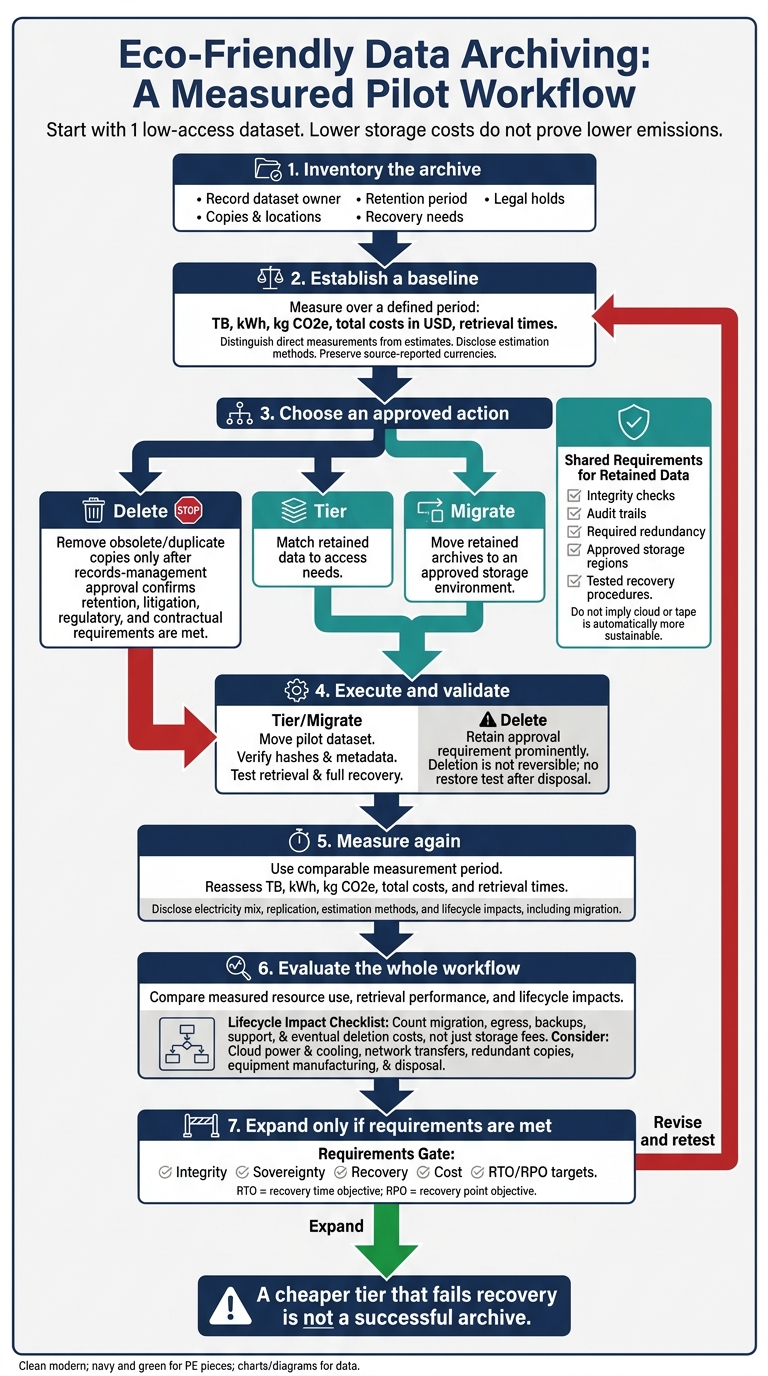
Eco-Friendly Data Archiving: A Measured Pilot Workflow
These cases reduced impact by cutting unnecessary data and matching retained data to access needs. They show 3 options: delete, tier, or migrate archives based on how often the data is needed.
Case Results and Evidence Limits
| Organization | Archive type | Technology | Approach | Reported result | Retrieval model | Source type | Key limitation |
|---|---|---|---|---|---|---|---|
| Carlsberg Group | SAP records | SAP archiving and retention tools | Reduce data in active systems | An estimated 55 TB archived across the SAP landscape; more than €2 million in project savings.[4][3] | Controlled retrieval of historical records | Vendor case study | Savings are source-reported; energy and emissions methods are not fully disclosed. |
| Danish Meteorological Institute | Weather records | Disk/tape tiers | Tier retained data | Lower cost per petabyte reported; no quantified energy reduction reported.[5] | Tape retrieval on request | Case study | No complete before-and-after kWh, emissions, or retrieval-time figures. |
| Unnamed advertising agency | Client assets | Hosted archive and backup integration | Remove office archive hardware | No quantified on-site power or cooling savings reported.[7] | Hosted, network-based access | Anonymous vendor case account | No independent verification or complete lifecycle comparison. |
| Tape Ark | Legacy tape archives | Tape extraction and cloud storage | Migrate legacy archives | Legacy tape archives migrated to cloud storage.[8][9] | Cloud access after extraction | Case-study context | Retrieval times and total lifecycle impacts are not disclosed. |
Keep modeled emissions estimates separate from reported business results. Carlsberg’s separate estimate of 30,000 kg CO2 avoided per 10 TB archived does not fully disclose its emissions boundary or calculation. Treat it as a case-study estimate, not a general factor.[10]
Use these cases to frame a small test: measure 1 low-access archive, then decide whether to delete, tier, or migrate it before expanding.
Pilot Steps and Decision Criteria
Inventory 1 low-access dataset. Record its owner, copies, retention period, legal holds, and recovery needs. Delete obsolete or duplicate copies only after records-management approval confirms that retention, litigation-hold, regulatory, and contractual requirements are met. Choose a storage tier with integrity checks, audit trails, required redundancy, approved storage regions, and tested recovery procedures.
Before migration, establish a baseline for TB, kWh, kg CO2e, total costs in USD, and retrieval times over a defined period. Then migrate the dataset, verify hashes and metadata, and test retrieval and full recovery.
Measure again over a comparable period. Disclose estimation methods, electricity mix, replication, and lifecycle impacts, including migration. Keep source-reported currencies, such as Carlsberg’s euros, unchanged unless a dated conversion is provided.
Evaluate measured resource use, retrieval performance, and lifecycle impacts. Count migration, egress, backups, support, and eventual deletion costs, not just storage fees. A cheaper tier that fails recovery is not a successful archive. Expand only when integrity, sovereignty, recovery, cost, and RTO/RPO targets are met.
FAQs
How can I measure archive emissions on shared infrastructure?
Track resource use, such as byte-seconds or GB-months, with your cloud provider’s billing and usage tools. Shared environments often rely on allocated capacity, so find and remove redundant data to reduce wasted energy.
Track emissions with provider sustainability dashboards, such as the Azure Emissions Impact Dashboard or AWS Customer Carbon Footprint Tool. For more detailed assessments, use frameworks like Cloud Carbon Footprint.
When does cloud migration outweigh its environmental costs?
Cloud migration can deliver gains that outweigh its energy and carbon costs when businesses replace on-premises systems with energy-efficient cloud infrastructure powered by 100% renewable energy. Cloud infrastructure can be up to 4.1 times more energy-efficient, and liquid cooling can reduce data center energy use by 15%–20% [1].
Location matters, too. Choosing low-carbon regions can reduce grid emissions by 60%–75%, while renewable-backed solutions can cut total carbon emissions by up to 99% [1].
How can I set realistic archive recovery targets?
Assess storage needs and restore frequency to identify “dark data” and right-size capacity and storage tiers. Use that baseline to set service-level agreements (SLAs) for storage tiers and access. Automate tiering to move rarely accessed data into colder archive classes while keeping active data in tiers that support faster retrieval.
Track retrieval metrics and set benchmarks for access frequency and acceptable restore times for each data class. Review and adjust these benchmarks quarterly as usage and performance change. [1][2]