Dynamic content delivery is the key to meeting the expectations of B2B audiences who demand personalized, timely experiences. By leveraging real-time data and behavioral triggers, businesses can tailor content to individual users based on factors like industry, company size, and browsing behavior. Companies like Personio and Ruggable have already seen massive improvements in conversion rates - 45% and 700% respectively - by implementing these systems.
Here’s what you need to know:
- Dynamic content adapts automatically to user data, unlike static content, making it scalable for large audiences.
- Challenges include outdated CMS platforms, database bottlenecks, and maintaining consistency across platforms.
- Solutions involve using a headless CMS, CDNs, and structured modular content to streamline workflows.
- Automation ensures dynamic content responds instantly to user behavior, improving engagement and ROI.
- Metrics like conversion rates, time on page, and assisted conversions help measure success and refine strategies.
Dynamic content delivery isn’t optional for competitive B2B companies - it’s a must-have for driving engagement and measurable growth. Start small, focus on high-impact workflows, and scale from there.
How 3 Brands Used AI To Personalize Content At Scale And Won
sbb-itb-01010c0
The Basics of Dynamic Content Delivery
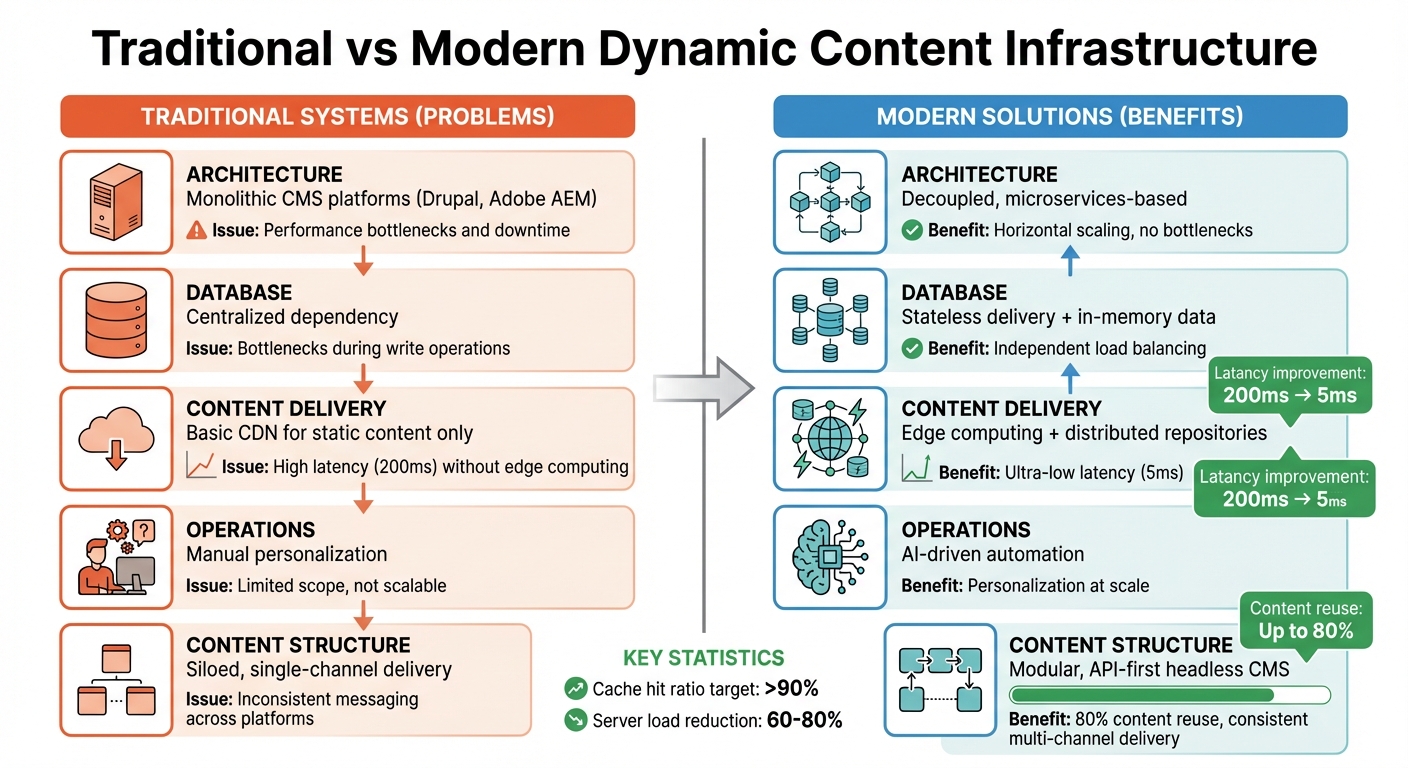
Traditional vs Modern Dynamic Content Infrastructure Comparison
What Dynamic Content Is
Dynamic content refers to automated, real-time personalization that adjusts based on audience signals and customer data. Unlike static content, which displays the same information to all visitors, dynamic content adapts to the viewer's context. This allows marketers to deliver tailored experiences at scale using real-time data.
In B2B settings, dynamic content can leverage firmographic data - such as industry, revenue, or employee count - to customize messaging. For example, enterprise decision-makers might see case studies relevant to large organizations, while smaller businesses receive materials better suited to their needs. This quick adaptability ensures visitors encounter content that resonates with them, avoiding the pitfalls of one-size-fits-all messaging.
Why B2B Companies Need Dynamic Content
Personalizing content manually in large-scale B2B operations is both time-intensive and limited in scope. Dynamic delivery solves this problem by using modular components - like headlines, calls-to-action, or visuals - that automatically adjust according to user data. This approach allows companies to scale personalized experiences without requiring a large marketing team.
B2B sales cycles are often complex, involving multiple stakeholders and lengthy decision-making processes. Dynamic content can smooth this journey by tailoring the experience: new visitors might see introductory materials, while returning qualified leads could access tools like ROI calculators or product demos. This flexibility allows a single website to cater effectively to both enterprise clients and smaller businesses.
With Google's planned phaseout of Privacy Sandbox in 2025, companies will need to rely more heavily on first-party data. Tools like "Intent Engines" - which integrate Customer Data Platforms with Vector Databases - will become essential for delivering real-time, personalized experiences.
"AI-powered content personalization has moved from competitive advantage to competitive necessity".
Choosing and adopting dynamic content delivery systems is no longer optional for B2B companies aiming to stay competitive. However, scaling these systems introduces its own challenges.
Common Problems When Scaling Content Delivery
Dynamic content has clear benefits, but traditional systems often struggle to support it at scale. Many legacy CMS platforms, such as Drupal or Adobe AEM, rely on monolithic architectures that can’t handle the demands of high-traffic websites. This can lead to performance bottlenecks and even downtime.
"Traditional CMS platforms typically rely on monolithic architectures that are not built for the demands of high-traffic websites".
Database dependency is another issue. Conventional systems use centralized databases for both content creation and delivery, which can create bottlenecks during write operations and expose vulnerabilities. Additionally, while CDNs are great for static content, they can introduce latency when handling dynamic delivery without support from edge computing or in-memory storage.
Content consistency across platforms is yet another hurdle. Older systems designed for single-channel delivery often result in siloed content, leading to inconsistent messaging as users switch between devices or platforms.
"It's unrealistic to think AI will overcome sloppy content organization, convoluted workflows, or messy data".
For dynamic content delivery to succeed, companies need structured content and clean data. Without these, even the most advanced systems risk delivering inconsistent or irrelevant recommendations.
| Challenge | Impact on Scaling | Modern Solution |
|---|---|---|
| Monolithic Architecture | Performance bottlenecks, downtime | Decoupled, microservices-based architecture |
| Database Dependency | Bottlenecks during write ops | Stateless delivery and in-memory data |
| High Latency | Slow global load times | Edge computing and distributed repositories |
| Manual Operations | Limited personalization scope | AI-driven automation and structured content |
Setting Up Your Dynamic Content Infrastructure
To tackle previous challenges, you need a modern infrastructure built for flexibility and scalability. This setup typically includes three key elements: a headless CMS with an API-first design, a content delivery network (CDN), and well-integrated data systems. Each component serves a distinct purpose, and when they work together, they eliminate many of the inefficiencies found in older systems.
Using a Headless CMS and API-First Architecture
A headless CMS separates content management from how that content is displayed. It structures content into formats like JSON or XML, which are then delivered via APIs to various platforms - whether it’s a website, a mobile app, or even a voice assistant. This approach directly addresses common bottlenecks in traditional setups.
"A headless CMS is a content API with an editing interface combined with it. It stores your content as structured data, exposes it through an API, and doesn't care what you do with it after that."
- Eugene Boruhov, Solution Architect, FocusReactive
This system uses stateless delivery, meaning no data is stored on the server between requests. Load balancers distribute traffic across servers independently of the database, making it easy to scale horizontally by adding more servers as needed.
The API layer acts as the backbone of communication. REST APIs are popular for their predictability and caching capabilities, while GraphQL allows clients to request only the data they need, reducing unnecessary data transfers. Webhooks notify frontends or CDNs about content updates, triggering cache invalidation or site rebuilds automatically. For critical pages, like checkout flows or legal disclaimers, versioned APIs can provide a safety net, ensuring you can roll back changes if issues arise.
In January 2026, developer Dre Dyson transitioned a client's infrastructure from 18 WordPress sites and 3 React frontends to a headless setup. By organizing APIs and implementing schema governance, the team significantly reduced deployment time and minimized API errors.
Another benefit of a headless CMS is centralized content storage. For instance, a single "Author" object can be referenced across multiple blog posts. Updating the author's bio in one place ensures it’s updated everywhere, reducing inconsistencies and cutting deployment times by up to 90%.
Pricing for headless CMS platforms varies: single-site setups often start at $300 per month, while enterprise plans with multiple locales and editors can cost $2,000–$4,000 per month.
Setting Up Content Delivery Networks (CDNs)
CDNs distribute your content across multiple geographic locations, reducing the distance between users and servers. This can dramatically lower latency - modern edge computing can bring response times down from 200 ms to as little as 5 ms.
Edge workers, like Cloudflare Workers or Lambda@Edge, handle tasks such as geolocation redirects, A/B testing, or price localization directly at the edge. This reduces the load on your origin servers.
For dynamic content, caching is key. Use long TTLs (time-to-live) for static assets with immutable flags and shorter TTLs (1–5 minutes) for dynamic HTML or API responses. High-performing teams aim for cache hit ratios above 90%, which can reduce server load by 60–80%. Even a small improvement in latency - just 100 ms - can increase eCommerce conversion rates by 1.1%. Cache busting techniques, like content hashing (e.g., app.a1b2c3d4.js), or automated cache purges in your CI/CD pipeline ensure users always get the latest version after updates.
| Provider | Starting Price | Key Feature |
|---|---|---|
| Cloudflare | Free | Largest edge network, Workers for edge compute |
| AWS CloudFront | Pay-per-use (1TB free/mo) | Deep integration with the AWS ecosystem |
| Fastly | $50/month | High-speed cache purging and configuration |
| Bunny CDN | $1/month | Budget-friendly with built-in image optimization |
Connecting Your Data Systems
Your CMS should focus on delivering content, not trying to do everything. Let specialized tools handle other tasks: CRMs for customer data, eCommerce platforms for inventory and pricing, and analytics tools for user behavior insights.
"The CMS is not the hard part. Integration is. If your headless CMS is not deeply connected to your existing tools, it becomes just another system your team has to manage."
- Subika Khan, Content Specialist
Use webhooks and event brokers (like Kafka or SNS) to send lightweight notifications when content changes, triggering downstream updates. Instead of pushing entire datasets, these notifications prompt systems to pull only the data they need.
Store personalization rules in your CMS, but resolve customer-specific data at request time using your CRM or CDP. This approach keeps sensitive information secure and avoids duplication. For example, Adobe Target integrates with Contentstack via a custom "Audiences" field, linking content to user segments. When users visit, Adobe Target’s JavaScript SDK retrieves personalized content based on their context.
In 2025, HR software company Personio implemented account-based marketing personalization by connecting their CMS to customer data systems. By tailoring content for enterprise clients versus small businesses, they boosted conversion rates by 45% and 46%, respectively.
Keep middleware lightweight and stateless. Its role should be limited to tasks like mapping CMS fields to legacy schemas, not storing business logic. For search functionality, avoid indexing raw CMS data. Instead, create search-optimized projections with metadata like content freshness and field weighting.
With these systems in sync, you’ll be ready to deliver modular, scalable content seamlessly.
Building Modular Content That Scales
Once your system is ready, the next step is to organize your content for easy reuse across different platforms and audiences. Modular content breaks down information into smaller, reusable pieces that can be combined in various ways. This method can lead to up to 80% content reuse and significantly cut localization costs by the same percentage.
Creating Reusable Content Blocks
Modular content relies on reusable building blocks - referred to as Atoms, Molecules, and Organisms - that can be assembled to fit different needs. These components are structured into three layers:
- Atoms: The smallest elements, like button text or product SKUs.
- Molecules: Groups of elements, such as product cards or testimonials.
- Organisms: Larger, more complex sections, like hero banners or FAQ accordions.
"Modular content solves this by letting you assemble once and expand everywhere."
- Brendan Cooney, Director of Customer Experience, Agility CMS
The goal is to separate content from its presentation. For example, instead of storing content as complete web pages, use structured data formats like JSON or GraphQL in a headless CMS. A single product card module might include fields like Title, Description, Image, and Call-to-Action. This same module can then appear as a styled HTML card on a website, a simplified version in an app, or as plain text in an email.
Metadata tagging and referential relationships make it easy to serve the right content to the right audience. For instance, linking an author profile to multiple blog posts ensures that updating the bio in one place updates it everywhere. Similarly, tagging content by audience, topic, or usage rights lets automated systems deliver the most relevant blocks to specific segments.
Start with a content audit: export your existing materials and tag them based on usage - Evergreen, Campaign, or One-Time. This helps identify the best candidates for modularization. Focus on repetitive elements like headers, footers, and navigation, as well as frequently reused high-performing content. But don’t overdo it - breaking content into overly small pieces can lead to "content chaos", making the system harder to manage.
| Component Type | Purpose | Example | Typical Reuse Potential |
|---|---|---|---|
| Atoms | Smallest units | Button text, SKU | ~95% |
| Molecules | Grouped elements | Product card, testimonial | ~80% |
| Organisms | Complex sections | Hero banner, FAQ accordion | ~60% |
These modular blocks form the foundation for creating dynamic templates that adapt content for different platforms.
Implementing Dynamic Templates
Dynamic templates use these modular blocks to deliver tailored experiences across emails, websites, and landing pages. While the template layout remains consistent, the content adapts based on the viewer and context. By maintaining a single source of truth for your content, you can apply different rendering rules for each platform. For example, a website might use fully styled HTML, while a mobile app displays a simplified version, and emails show text-only formats. This approach ensures that updates made in one place automatically reflect across all channels.
To enable personalization, use metadata tagging on your content blocks. This allows personalization engines to identify and display the most relevant content for specific audience segments. For example, tagging a product card with labels like "Enterprise" or "Small Business" helps the system decide which version to show. Webhooks can trigger automatic updates across all platforms whenever a core content block changes. For more complex workflows, set up multi-step approvals involving subject matter experts, legal teams, and brand managers before publishing.
Maintaining Brand Consistency While Personalizing
Dynamic templates make personalization easier, but maintaining brand consistency is critical. While 81% of customers prefer personalized experiences, it’s important to limit customizations to design elements like CSS and layout to ensure the content itself remains consistent.
"A well-structured content model makes it easier for your dev team to manage updates and content changes without scrambling to fix broken code every time."
- Kathy Deady, Content Marketing Manager, Optimizely
Standardize the fields in each module. For example, every product card should always include Title, Description, Image, and Call-to-Action fields, no matter the audience or platform. This consistency ensures quality control as you scale. While AI can help create personalized content variations, human oversight is essential to maintain accuracy and brand voice. Use granular permissions in your CMS to control who can create, edit, or publish specific modules, preventing unauthorized changes that might dilute your brand.
Keep your content model simple. Avoid overcomplicating it by trying to account for every possible scenario. A clean, straightforward model is easier to manage and scales more effectively as your audience grows. Establish relationships between content types early, like linking product pages to customer reviews, to create seamless user experiences while retaining control.
Automating Your Content Delivery Workflows
Once you’ve established a solid modular content setup, automation becomes the key to scaling and personalizing your delivery workflows. Managing thousands of users across multiple channels manually? That’s just not feasible. And here’s why automation matters: 76% of consumers are more likely to buy from brands that offer personalized experiences - automation makes this possible on a larger scale.
Tools for Automating Dynamic Content
Automation tools like webhooks, AI engines, and marketing platforms help streamline your processes. Think of webhooks as the nervous system of your content infrastructure, sending real-time updates whenever content changes.
AI-powered platforms, such as Hushly and Uberflip, analyze user behavior and intent to suggest the most relevant content. Meanwhile, tools like Marketo Engage handle lead scoring and trigger campaigns based on user actions. For example, personalized automated emails generate 320% more revenue than generic ones, making these tools essential for B2B success.
| Tool Category | Platform Examples | Primary Role in Automation |
|---|---|---|
| Headless CMS | Cosmic | Sends webhooks for content lifecycle events (create, edit, delete). |
| Personalization | Hushly, Uberflip | Uses AI to deliver tailored content hubs and recommendations. |
| Marketing Automation | Marketo Engage | Manages lead scoring and triggers content or emails based on behavior. |
| Search & Indexing | Algolia | Updates search results automatically when content changes. |
| Deployment/Hosting | Netlify, Vercel | Triggers automatic site rebuilds after publishing content. |
To keep your automation secure, always validate webhook requests with secret keys in custom HTTP headers. Additionally, idempotency keys can help prevent duplicate triggers, ensuring smooth operations.
With these systems in place, your content delivery can respond instantly to user behavior, creating a seamless experience.
Setting Up Behavior-Based Content Triggers
Behavior-based triggers allow your content to adapt dynamically to user actions. Imagine your customer journey as a state machine, where users progress through stages based on their interactions. For example, if a trial user visits your pricing page, you could display testimonials or case studies. If someone downloads a whitepaper, follow up with related resources within 24 hours.
"A customer journey map is just a state machine. A user moves from one state to another based on triggers (events)."
- Michael, Pro Developer & n8n Guru
Effective triggers use "if/then" logic based on meaningful user signals, such as time spent on a page, referral source, or high-intent actions like requesting a demo. Brands that excel at personalization can achieve a 43:1 return on investment, compared to 12:1 for generic messaging. For example, when a user deploys their first project, you might send a congratulations email and notify an account manager.
Replace daily batch processing with event-driven webhooks that react in real time. For instance, dynamic call-to-action buttons could change based on where a user is in their journey - show “Download Guide” to new visitors and “Schedule Demo” to returning leads who’ve engaged with multiple resources.
| Lifecycle Stage | Behavioral Trigger Example | Personalization Action |
|---|---|---|
| Welcome | User signs up for trial | Tailored onboarding based on the first feature they use. |
| Activation | No teammate invited in 48 hours | Send a tutorial video as a gentle reminder. |
| Expansion | Account hits 90% of data limit | Celebrate growth with an email and upgrade options. |
| Retention | Weekly activity drops by 50% | Customer Success Manager reaches out for a personalized check-in. |
| Dunning | Payment fails | Trigger a multi-step reminder sequence, escalating urgency. |
This level of responsiveness ensures your content feels timely and relevant to every user.
Handling Growing Data Volumes
Scaling automation for large-scale engagement comes with its own challenges, especially as data volumes grow. For example, businesses using marketing automation report up to a 451% increase in qualified leads. To handle this growth, you’ll need a robust infrastructure.
Adopt MACH architecture - Microservices, API-first, Cloud-native, and Headless - to ensure your systems can scale horizontally as needed. Use Content Delivery Networks (CDNs) and edge computing to cache content closer to users, reducing latency during high-traffic periods. For instance, Miami HEAT used Contentstack’s headless CMS to support 70 users managing 250 dashboards, cutting time-to-market by over 50% and boosting in-app traffic by 200%.
Streamline triggers by aggregating events. For example, if a user clicks five pages in 30 seconds, combine those actions into a single automation trigger. Use exponential backoff for retry logic - this avoids hammering your systems during temporary outages by spacing out retries.
"A stale CRM is a useless CRM."
- Michael, Pro Developer
Centralize customer data into a unified hub to eliminate silos and maintain consistency across channels. Serverless functions can fetch and merge data into templates only when needed, cutting down on constant database queries. For large-scale email campaigns, automated IP warmup processes can help protect your sender reputation.
Run automation tasks in parallel whenever possible. For instance, you could update search indexes and purge CDN caches simultaneously. Leesa, a direct-to-consumer brand, used Contentstack to automate SEO and improve personalization, reducing website load times from six seconds to under one second - while growing organic traffic by 30x.
This approach not only optimizes personalization but also ensures your content infrastructure can handle the demands of a growing audience.
Tracking and Improving Your Content Delivery
Once you've automated your content workflows, the real challenge begins: measuring and refining their effectiveness. Setting up a dynamic content system is just the first step - understanding its impact is where the magic happens. The problem isn't a lack of data; it's figuring out which metrics truly connect to business growth. For instance, while 83% of leaders aim to prove ROI, only 36% feel confident in their ability to measure it accurately. This disconnect often stems from gaps in attribution infrastructure.
Metrics That Matter for Dynamic Content
With your advanced content delivery system in place, shift your focus to metrics that drive B2B growth. Forget about obsessing over pageviews - they rarely tell the full story. Instead, prioritize behavioral signals like average time on page, scroll depth (e.g., users reaching 75% of your content), and pages per session. These provide a more meaningful picture of engagement.
Conversion data is another goldmine. Look at metrics like content-attributed pipeline value and assisted conversions to understand how your content influences the buyer's journey, even if it’s not the final touchpoint. To calculate ROI, use this formula: ((Revenue from Content - Content Cost) / Content Cost) * 100. On average, top brands see a revenue return of 4.33:1 from their content efforts. Ideally, your content should contribute to 20%–50% of your B2B sales pipeline.
Operationally, evaluate whether your system can scale personalization without increasing your team size and whether it helps shorten sales cycles.
| Funnel Stage | Primary Goal | Key Metrics to Track |
|---|---|---|
| Awareness (TOFU) | Attract new audiences and build visibility | Pageviews, Unique Visitors, Traffic Sources, SERP Impressions |
| Consideration (MOFU) | Nurture leads and build trust | Time on Page, Scroll Depth, CTR on Internal Links, Resource Downloads |
| Conversion (BOFU) | Drive actions that lead to revenue | Form Submissions, MQLs/SQLs, Demo Requests, Purchase Conversion Rate |
Keep an eye out for data issues like broken tracking codes, inconsistent UTM parameters, or schema mismatches. Use observability platforms to monitor tracking setups in real time, so you can fix problems before they skew your decision-making.
Using Analytics to Understand Your Audience
Analytics tools can uncover the "why" behind user behavior. Heatmaps and session recordings, for example, highlight friction points where visitors hesitate or drop off. Track interactions like clicks, scroll depth, and time spent on specific sections to gauge intent. Personalized calls-to-action (CTAs) can perform up to 202% better than generic ones, but only if you know what drives engagement for each audience segment.
"An engaged user is one who moves from consuming content to interacting with it. Tracking these interactions - like a video play or a resource download - is how you move from measuring attention to understanding genuine audience intent."
- David Pombar, Trackingplan
Integrate data from your website, mobile apps, and CRM to create detailed visitor profiles. Analyze referral sources, search history, and past downloads to segment your audience into categories like "High-Value Shoppers" or "Industry Leads." Combine this internal data with third-party intent signals to discover what topics your audience is researching elsewhere. Then, deliver high-impact assets like ROI calculators at the moment they’re making decisions.
To tie anonymous visits to revenue, use technical attribution methods. For example, capture UTM parameters in localStorage and pass them through hidden form fields into your CRM. This preserves the "origin story" of every lead. Only 21% of marketers can accurately connect content consumption to revenue, so improving in this area can give you a strong competitive edge.
Continuous Improvement Based on Data
Adopt a layered approach to measurement with staggered review cadences: evaluate top-of-funnel metrics weekly, mid-funnel metrics monthly, and business-level outcomes quarterly. This structure helps you stay agile without overreacting to short-term changes.
Run quarterly content audits using a structured framework. Categorize your assets into four groups based on traffic and conversions:
- Stars (High Traffic, High Conversions): Amplify these with backlinks to maintain their performance.
- Traffic Drivers (High Traffic, Low Conversions): Improve CTAs and add lead magnets to boost conversions.
- Converters (Low Traffic, High Conversions): Enhance discoverability through better internal linking.
- Underperformers (Low Traffic, Low Conversions): Consolidate or retire these pieces using 301 redirects to preserve backlink equity.
Develop a content scoring model to evaluate each asset, assigning a score from 0 to 100 based on Engagement (40%), Conversion (35%), and Revenue (25%). Apply a 10% monthly decay multiplier to content older than 12 months to keep your "top performer" list current. Always test personalized experiences against a control group to measure actual impact. For example, returning visitors are six times more likely to schedule a demo than first-time visitors. By tracking how updates influence repeat engagement, you can refine your strategy over time.
This approach ensures your content system scales effectively while delivering measurable results for your business.
Conclusion
By following the infrastructure and automation workflows outlined earlier, you can achieve personalization at scale like never before. Building a dynamic content delivery system reshapes how you connect with your B2B audience. The numbers speak for themselves: brands that excel in personalization at scale see a 43:1 return on investment, compared to just 12:1 for those relying on generic messaging. With a solid data foundation, modular content, API-first architecture, and automated workflows, you can scale efficiently - without adding more headcount or manual effort.
The results are clear: a scalable dynamic content system delivers measurable ROI. Companies using account-based personalization have seen conversion rates jump by over 45%, while optimized content delivery slashed site load times from six seconds to under one second, driving 30x growth in organic traffic. These achievements come from carefully building infrastructure, testing consistently, and using real data to refine processes.
Start small by focusing on one high-impact workflow instead of trying to personalize everything right away. Target critical moments like trial activation or churn prevention, where personalization can deliver immediate value. With 71% of consumers expecting personalized experiences and only 34% of brands meeting that demand, there’s a clear opportunity to differentiate yourself in competitive B2B markets. These insights highlight the importance of integrating dynamic personalization seamlessly across your operations.
The shift from broad, one-size-fits-all marketing to personalized, meaningful conversations is no longer optional - it’s essential to stay competitive. With the right infrastructure, you can deliver experiences that feel tailored to each individual while serving thousands at once. Focus on metrics that matter, such as activation rates and expansion revenue, and let data guide your ongoing improvements.
Leveraging the resources and insights from The B2B Ecosystem (https://b2becosystem.com), you can build a dynamic content system that drives efficiency and measurable growth. Start with one impactful, personalized workflow and expand from there. When done right, personalization not only transforms engagement but also delivers superior business results.
FAQs
What’s the fastest way to start dynamic content without rebuilding our whole site?
The fastest way to serve dynamic content without completely revamping your site is by using a modern CMS equipped with real-time APIs and personalization tools. By integrating systems that utilize first-party data and behavioral cues, you can instantly deliver content tailored to your audience. Adding AI and automation into the mix takes this a step further, making personalization more effective while allowing you to scale your dynamic content strategy over time.
How do we personalize with first-party data without creating privacy or security risks?
To use first-party data effectively and securely for personalization, it's crucial to focus on user consent and data protection. Start by employing tools like preference centers and progressive profiling. These allow you to gather user data gradually and in a way that's transparent to your audience.
Make sure you're staying compliant with privacy regulations by using a solid consent management system. This helps you manage permissions and ensures you're respecting user preferences. Combining all collected data into a single customer view (SCV) can also enhance personalization efforts while keeping security intact.
The key here is to prioritize voluntary data sharing, maintain clear communication about how data will be used, and implement strong safeguards. These steps help build trust with users and reduce potential risks.
What are the 3 best metrics to prove dynamic content ROI in B2B?
When it comes to proving the ROI of dynamic content in the B2B space, three metrics stand out: engagement rate, conversion rate, and content personalization effectiveness.
- Engagement rate highlights how well your personalized content grabs and holds your audience’s attention. It’s a clear indicator of whether your content resonates with users.
- Conversion rate measures how effectively your content drives desired actions, like filling out a form, signing up for a demo, or making a purchase. This is where you see the impact of dynamic content on your bottom line.
- Content personalization effectiveness reflects how well your tailored content meets individual user needs. It’s a crucial measure for understanding if your personalization efforts are hitting the mark at scale.
Together, these metrics provide a well-rounded view of how dynamic content performs, helping you assess its success and justify your investment.