CORS does not protect your API. It only tells a browser which websites can read a response. If your B2B API reflects the wrong Origin, trusts null, or mixes credentials with weak allowlists, a partner user’s browser session can leak data to an attacker.
Here’s the short version:
- CORS is a browser rule, not login or permission control
- Bad gateway settings can affect every API behind them
- Common failures include origin reflection, weak string matching, and missing
Vary: Origin - B2B impact is high because exposed data may include pricing, contracts, inventory, account settings, and partner records
- One 2026 data point stands out: CORS issues made up 23.1% of accepted web app bug bounty findings in Q1 2026
- The safest setup is one gateway-managed policy with exact origin matching, tight credential use, short preflight cache times, and repeat checks during partner and API changes
If I were reviewing a B2B API today, I’d start with two simple tests: send Origin: https://evil.com and Origin: null. If either value comes back in Access-Control-Allow-Origin, that is a problem.
A quick view of the main risk areas:
| Risk area | What goes wrong | What that can lead to |
|---|---|---|
| Origin reflection | Server echoes any Origin |
Any site may read logged-in responses |
| Loose matching | Checks like includes('company.com') |
Attacker domains slip through |
null origin trust |
Sandboxed or local contexts get access | Browser-side data exposure |
Missing Vary: Origin |
Cached CORS response goes to the wrong site | Cross-partner response leaks |
| Split policy | Gateway and backend enforce different rules | Old or side routes become bypass paths |
Bottom line: I’d treat CORS like a high-risk config item, not a front-end checkbox. In B2B systems, one weak rule can turn a browser feature into a direct path to partner data.
CORS basics in modern B2B API architectures
Origins, preflight requests, and key response headers
An origin is the exact mix of scheme, host, and port. For example: https://portal.partner.com:443. Change even one of those parts, and the browser treats it as a different origin. In B2B setups, that often means a partner portal on one domain calling APIs on another. That detail matters because the browser’s Same-Origin Policy (SOP) uses this exact definition to decide whether a script on one page can read a response from another domain.
So when a browser portal on https://portal.partner.com calls https://api.vendor.com, the browser checks whether that API lets that specific origin read the response.
Simple requests, like GET, HEAD, and standard POSTs, go through right away. Non-simple requests, like PUT, DELETE, a JSON body, or a custom header such as Authorization, trigger an automatic OPTIONS preflight. That split matters in practice, because weak allowlists and loose credential rules often sit behind the CORS mistakes discussed next.
The main response headers are:
| Header | What it controls |
|---|---|
Access-Control-Allow-Origin |
Which partner domain can read the API response |
Access-Control-Allow-Credentials |
Whether cookies or other credentials can be sent |
Access-Control-Allow-Methods |
Which HTTP verbs are allowed cross-origin |
Access-Control-Allow-Headers |
Which custom headers the request can include |
Access-Control-Max-Age |
How long the browser can cache the preflight result |
Access-Control-Max-Age helps cut preflight traffic. Browser limits differ, though. Chrome caps it at 7,200 seconds, while Firefox allows up to 86,400 seconds.
Where CORS fits in partner portals and API gateways
In a common B2B setup, a partner’s browser-based portal runs on one domain, while the APIs it calls live on another, often behind an API gateway or reverse proxy. That gateway is a good place to enforce CORS policy, since it can keep rules consistent across the microservices behind it.
Putting CORS rules at the gateway cuts down on policy sprawl. But there’s a tradeoff. In B2B systems, one bad setting can turn into exposure across many partners. In plain English: a single bad CORS rule at the gateway can affect every API behind it. When the policy is wrong, the impact is immediate and spread across the whole layer.
CDNs and load balancers add another wrinkle. They can cache an origin-specific CORS response and then hand it to the wrong partner. The fix is simple: include Vary: Origin whenever the allowed origin is set dynamically.
The safest pattern is a browser-facing gateway with one tightly defined CORS policy. Trouble starts when those controls are set up the wrong way.
sbb-itb-01010c0
What research shows about CORS misconfigurations and business impact
The most common CORS misconfigurations
At the gateway layer, the most common CORS failures show up in a few familiar places: echoing the request Origin header, using dynamic origin reflection when credentials are required, loose origin matching, and trusting null origins.
One of the most documented problems in security audits is simply echoing the request Origin back in Access-Control-Allow-Origin. It sounds harmless at first. But when credentials are allowed, that setup can let any site read authenticated API responses.
Loose origin matching is another classic mistake. A check like includes('company.com') looks fine until you remember how easy it is to game. An attacker can use domains like company.com.attacker.io or evil-company.com to slip past weak checks. And when teams allowlist null, they open the door for sandboxed or local-file contexts to read responses.
Versioned or older endpoints add another weak spot. They often keep permissive CORS rules long after the main app has been tightened up. The same thing happens when the gateway and backend enforce CORS in different ways. Those gaps become handy bypass routes.
That’s the core problem: these mistakes turn CORS from a browser safeguard into a data leak path.
How attackers exploit weak CORS to access data
A common attack flow is pretty simple. The attacker gets a user from a partner portal to load a malicious page. If the API reflects the attacker’s origin and allows credentials, the browser sends the victim’s live session along with the request. The response then becomes readable to the attacker’s script.
Trusted subdomains are a big deal in B2B setups. Many partner portals rely on wildcard subdomains such as *.partner-portal.com. That can go sideways fast. If an attacker gets XSS or finds an open redirect on some old staging or forgotten legacy subdomain, the production API may still treat that origin as safe and expose live data.
In more advanced cases, weak CORS can also expose internal-only responses from hosts that send permissive CORS headers but have weak or missing authentication. At that point, the blast radius can stretch far beyond one partner account.
Business impact: partner data, workflows, and trust
Once a browser can read the response, this stops being “just a web security bug.” It becomes a business problem. In B2B systems, CORS flaws can expose pricing, contract terms, inventory, and partner settings. From there, the issue can grow into account takeover or workflow abuse. This maps to CWE-942, permissive cross-domain policy.
The table below shows how the most common failures connect to business damage.
| Misconfiguration Type | Technical Effect | Business Impact |
|---|---|---|
| Origin Reflection + Credentials | Any site can read authenticated responses | PII, pricing, or contracts |
| Null Origin Trusted | Sandboxed iframes bypass SOP | Sensitive partner data exposed |
| Loose Origin Matching | Attacker-controlled domains are trusted | Contracts, pricing, inventory |
| Overbroad Methods/Headers | Excessive methods such as DELETE or PATCH are allowed |
Unauthorized partner changes |
Missing Vary: Origin |
CDN serves the wrong CORS policy to the wrong origin | Intermittent portal leaks |
In B2B environments, the damage isn’t limited to exposed records. These failures can also interrupt live partner workflows and weaken trust at the exact moment teams rely on those systems most.
CORS Misconfigurations: How Hackers Steal Your Cookies?
Mitigation steps and gateway-level governance
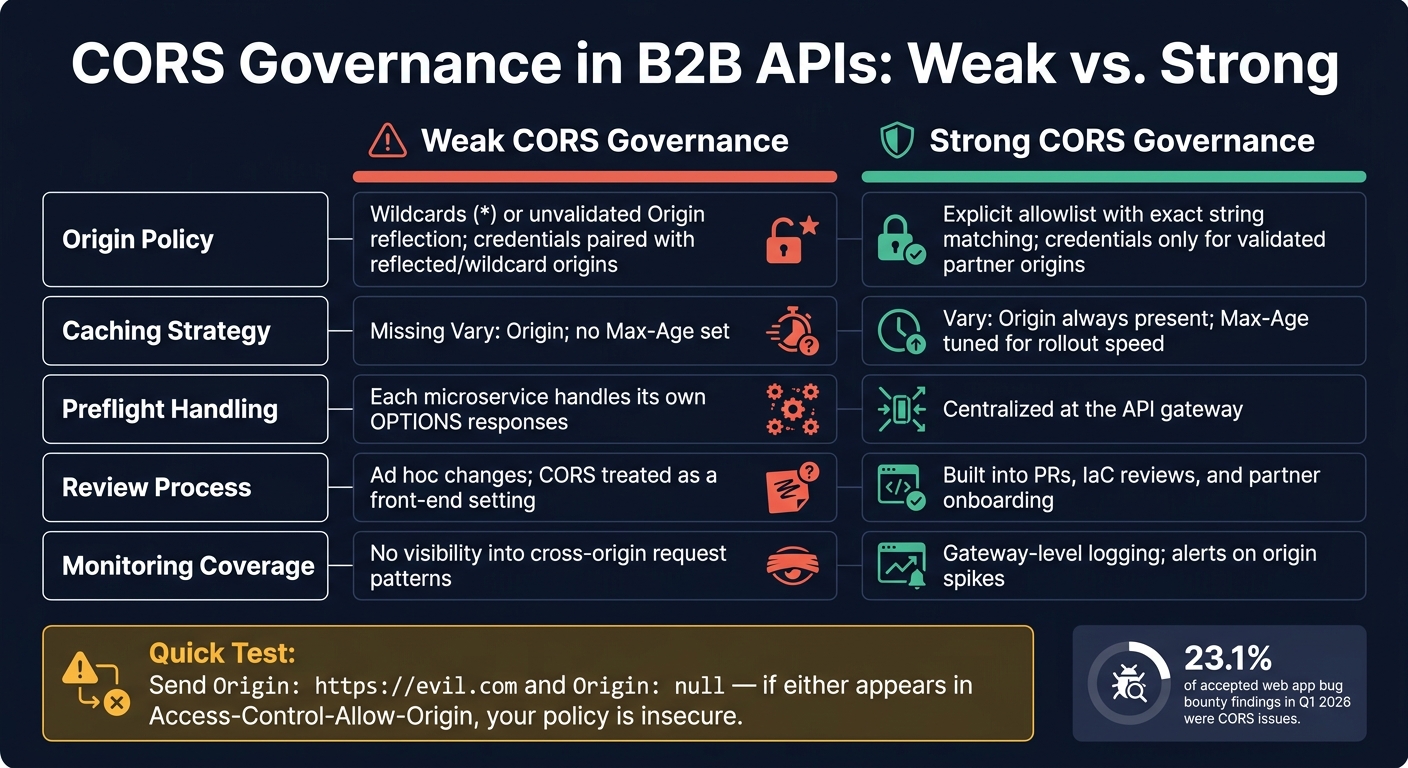
CORS Misconfiguration Risks in B2B APIs: Weak vs. Strong Governance
Safer CORS policy design for sensitive APIs
The failures above point to a simple fix: put CORS control in one place, test it all the time, and handle changes with the same care as access control.
A good move is to centralize CORS enforcement at the API gateway. That keeps policy in sync across microservices and lets the gateway answer preflight OPTIONS requests before they hit backend resources. Teams then have one spot to update, audit, and roll back policy.
Use exact-string matching with a static partner allowlist. Only reflect an origin after it passes validation, and send Vary: Origin whenever the origin is set dynamically.
Keep Access-Control-Max-Age short enough that policy updates reach clients without a long delay. For authenticated or state-changing routes, use strict allowlists. Broader CORS settings make more sense for public, read-only endpoints.
Testing, monitoring, and change control
Policy on paper isn't enough. CORS needs automated checks and review before anything goes live.
Automated scanning can catch common mistakes early. SAST tools can flag wildcard origins and framework defaults that allow any origin. In staging, DAST scanners can check whether the gateway reflects Origin: https://evil.com or Origin: null. If either value shows up in Access-Control-Allow-Origin, the policy is insecure.
AI-generated code can slip in permissive defaults, so CORS changes should be reviewed like access-control changes, especially in pull requests and infrastructure-as-code templates.
At the gateway, log odd Origin header patterns. A sudden jump in newly allowed origins can point to reflected-origin misconfiguration or active probing. It also helps to track policy-match rates and alert on any credentialed wildcard setup.
Applying controls across the B2B stack
CORS works best when teams treat it as an ongoing control across onboarding, deployment, and monitoring. Things start to drift when CORS is handled like a one-time setup. Periodic audits against the current partner list help keep the allowlist aligned.
| Configuration Trait | Weak CORS Governance | Strong CORS Governance |
|---|---|---|
| Origin Policy | Wildcards (*) or unvalidated Origin reflection; credentials paired with reflected or wildcard origins |
Explicit allowlist with exact string matching; credentials only for validated partner origins |
| Caching Strategy | Missing Vary: Origin; no Max-Age set |
Vary: Origin always present; Max-Age tuned for rollout speed |
| Preflight Handling | Each microservice handles its own OPTIONS responses |
Centralized at the API gateway |
| Review Process | Ad hoc changes; CORS treated as a front-end setting | Built into PRs, IaC reviews, and partner onboarding |
| Monitoring Coverage | No visibility into cross-origin request patterns | Gateway-level logging; alerts on origin spikes |
CORS governance should live in gateway policy, deployment review, and monitoring.
Conclusion: Next steps for decision-makers
The research points to a simple rule for B2B teams: make a full list of every browser-accessible API, remove CORS when the frontend and API share the same origin, and set the API gateway as the single place where CORS policy is managed for every other case, using exact-string allowlists.
Once that policy sits in one place, check it with a quick origin-reflection test. Send Origin: https://evil.com and Origin: null. If either value is echoed back in Access-Control-Allow-Origin - including null - that counts as a failure.
From there, CORS should stay in the normal review cycle for API governance. Check it during partner onboarding, API changes, and periodic access-control audits so policy drift doesn’t slip in.
FAQs
Does CORS replace authentication?
No. CORS does not replace authentication.
CORS is a browser-enforced security rule. Its job is to control which origins can read API responses. It does not verify who the caller is.
There’s another big point here: CORS only applies to browser-based JavaScript. So your backend still needs to handle authentication, authorization, and session-scoped checks on every request.
Why is trusting null origins risky?
Trusting null origins is risky. It can give access to untrusted, potentially malicious contexts. Browsers may send Origin: null for requests that come from sandboxed iframes, locally opened files, or data URIs.
If your API accepts null, an attacker can use those contexts to make authenticated requests to your server and read sensitive user data. Always reject null explicitly.
How often should B2B teams audit CORS settings?
Review CORS settings on a regular basis, not just after something goes wrong. Keep the policy tight with an exact allowlist, and don't use origin reflection or wildcard origins when credentials are involved.
Check these settings again any time cross-origin rules change or a new partner integration is added. In production, explicitly reject null origins and send the Vary: Origin header to help prevent cache poisoning.