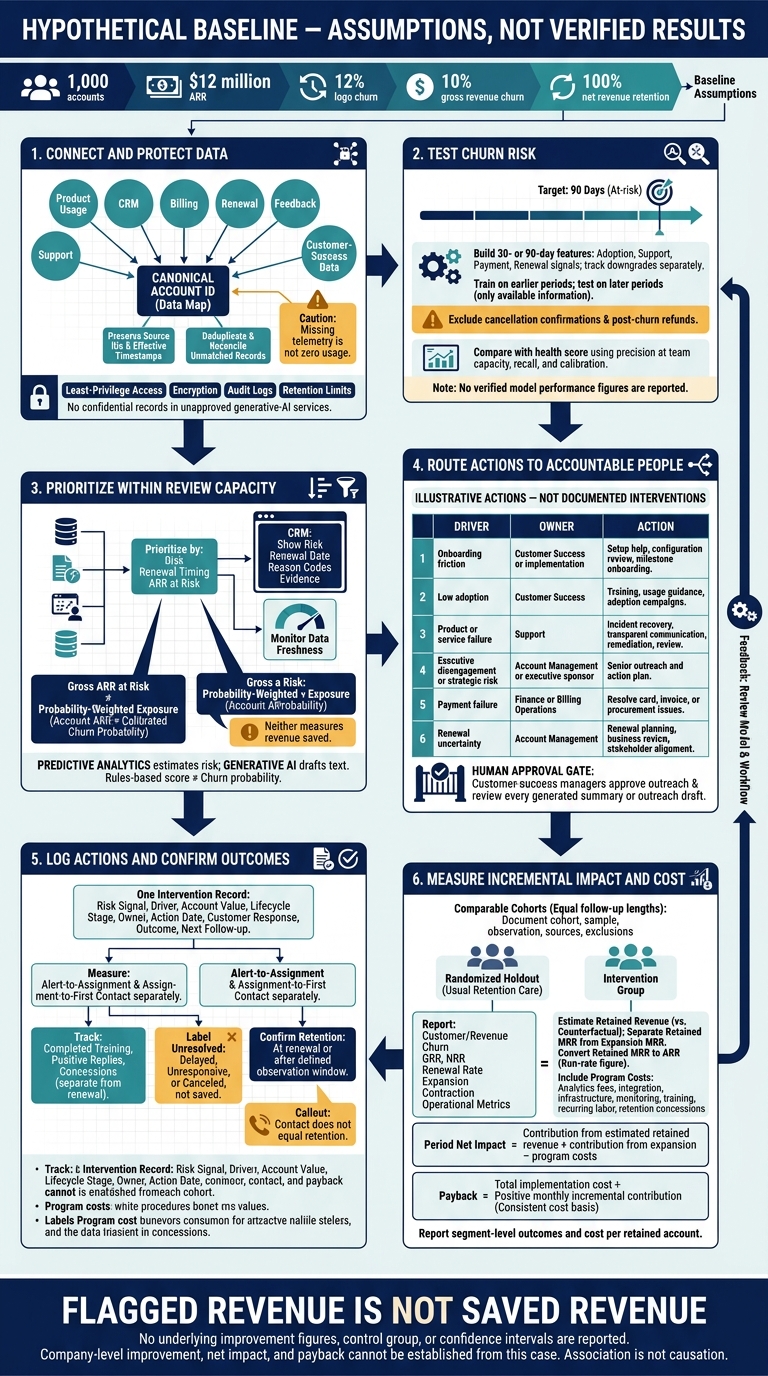
I would use AI to prioritize churn risks, not claim revenue saved without proof. In this hypothetical case, 1,000 accounts and $12 million in ARR provide a starting point: 12% logo churn, 10% gross revenue churn, and 100% net revenue retention. These are assumptions, not verified results.
My approach connects product, billing, support, and CRM data, then puts people in charge of each response:
- Check the signals: Test risk scores on later data and protect customer records.
- Assign the right action: Route onboarding, usage, service, renewal, and payment issues to the right owner.
- Measure the outcome: Compare renewal results with a comparison group, then account for program costs and concessions.
The rule I would keep front and center: <u>flagged revenue is not saved revenue</u>. Any claim that AI reduced churn needs measured outcomes and a sound comparison.
AI SaaS Churn Prevention: From Risk Signals to Measured Impact
Connecting Data and Deploying AI
Data Preparation and Model Testing
With the baseline set, the team can connect data and test the scoring model. Map workspaces, users, subscriptions, and subsidiaries to one canonical account ID. Keep source IDs and effective timestamps. Join product usage, CRM, support, billing, renewal, feedback, and customer-success data, then deduplicate records and reconcile unmatched entries before scoring. Missing telemetry is not zero usage. Label delayed inputs separately.
To identify accounts at risk of nonrenewal within 90 days, build 30- or 90-day features from adoption, support, payment, and renewal signals. Track downgrades separately. Train on earlier periods and test on later ones, using only data available at each scoring date. Exclude cancellation confirmations and post-churn refunds.
Compare the model with the existing health score using precision at team capacity, recall, and calibration - not accuracy alone. No verified performance figures are reported here.[6][8][10][11][12][14]
The scores then enter daily CRM workflows.
Using Risk Scores in Team Workflows
Once scores are calibrated, prioritize accounts by risk, renewal timing, and ARR at risk, within the team's review capacity. Predictive analytics estimates churn risk; generative AI drafts or summarizes text.[7] A rules-based health score is not a churn probability.
Show risk, renewal date, and reason codes in CRM, and monitor how current the data is separately. Use usage segments and ticket sentiment to guide approved actions. Require review of every generated summary or outreach draft.
Keep gross ARR at risk separate from probability-weighted exposure. The latter multiplies account ARR by a calibrated churn probability. Neither measures revenue saved. Show the underlying usage, support, or billing evidence so customer-success managers can check whether a suggested action fits the account.
Human Review and Data Protection
Customer-success managers approve outreach. Data staff own scoring, data pipeline checks, calibration, and drift monitoring. Security and privacy stakeholders approve permitted data use. Apply least-privilege access, encryption, audit logs, and retention limits. Keep confidential records out of unapproved generative-AI services.
Match alert volume to review capacity, and record dismissed alerts and the reasons for dismissal. Check false positives against later outcomes - a successful renewal does not prove an alert was wrong, because an intervention may have helped. Before changing thresholds, review how current the data is, score distributions, and precision at the selected capacity.[9][13]
Next, map each risk band to a specific retention action.
sbb-itb-01010c0
Retention Actions and Team Responsibilities
Matching Actions to Churn Drivers
Once risk scores are in CRM, match each alert to a retention action. The source material does not document actual interventions or priority thresholds, so the mapping below is illustrative.
- Onboarding friction goes to Customer Success or implementation for setup help, configuration review, and milestone-based onboarding.
- Low adoption goes to Customer Success for training, usage guidance, and adoption campaigns.
- Product or service failure goes to Support for incident recovery, transparent communication, remediation, and post-resolution review.
- Executive disengagement or strategic risk goes to Account Management or an executive sponsor for senior outreach and an action plan.
- Payment failure goes to Finance or Billing Operations to resolve card, invoice, or procurement issues.
- Renewal uncertainty goes to Account Management for renewal planning, business review, and stakeholder alignment.[15][18]
Next, decide which accounts need attention first and who owns each follow-up. Choose the first action based on lifecycle needs and its likely effectiveness: activation help for new accounts, proof of business value for mature accounts, and commercial and stakeholder planning near renewal. Any weighting rules or intervention thresholds not reported in the source remain illustrative.
Keep one intervention record per alert. Include the risk signal, driver, account value, lifecycle stage, owner, action date, customer response, outcome, and next follow-up. This log helps connect interventions to later outcomes.
Contact does not equal retention. Track completed training or a positive reply separately from renewal. Record concessions separately, too. Classify unresolved cases as delayed, unresponsive, or canceled - not “saved.” Confirm retention at renewal or after a defined observation window.[17]
Manual vs. AI-Assisted Workflows
The workflow matters as much as the model. The table compares the previous and AI-assisted methods; response times were not reported.
| Workflow stage | Previous method | AI-assisted method | Responsible team | Response time |
|---|---|---|---|---|
| Detection | Spreadsheet or CRM review | Scheduled or continuous model scoring | Data science, operations, or CS operations | Not reported |
| Prioritization | CSM judgment and renewal calendar | Risk score plus ARR, stage, renewal date, and driver | CS operations and CSM leadership | Not reported |
| Outreach | Generic email or ad hoc call | Driver-specific playbook | CSM, account management, support, or finance | Not reported |
| Follow-up | Manual notes and reminders | Automated tasks, outcome fields, usage checks, and reminders | Intervention owner and CS operations | Not reported |
Every handoff should include the risk reason, supporting evidence, recommended action, deadline, status, and escalation path. If an action fails, record why before escalating. Route unresolved product defects to Product and Engineering, and commercial issues to Account Management.
Measure alert-to-assignment and assignment-to-first contact separately. This separates routing delays from execution delays. Timing and labor records are still needed to verify faster outreach or lower workload.[15][16][18]
The next measurement step is to test whether faster responses and clearer routing reduced churn.
Churn Results and Revenue Impact
Measurement Method and Before-and-After Metrics
Compare pre- and post-deployment cohorts using the risk scores, intervention logs, and outreach records above. Apply the same reporting rules to both groups. Document the cohort, sample size, observation window, data sources, and exclusions. Match baseline and post-deployment periods with equal follow-up lengths.[19][21][25]
Report customer churn, revenue churn, GRR, NRR, renewal rate, expansion, and contraction. Also report intervention volume, review rate, median alert-to-first-contact time, acceptance rate, response rate, and save rate.[19][20][21][23]
The source material provides no underlying figures, so company-level improvement cannot be verified. Report both absolute and relative changes when those figures are available.[23][26]
Retained Revenue, Costs, and Payback
Translate measured churn and retention changes into revenue impact and program cost. Estimate retained revenue against a baseline counterfactual: what revenue would have been without the program. Report retained MRR separately from expansion MRR, and convert retained MRR to ARR only as a run-rate figure.[20][24]
Program costs should include analytics fees, integration, infrastructure, monitoring, training, recurring labor, and retention concessions.
Calculate period net impact as contribution from estimated retained revenue plus contribution from expansion, minus program costs. Calculate payback by dividing total implementation cost by positive monthly incremental contribution. Use the same cost basis throughout.
Without margin, renewal timing, recognized revenue, and cost records, neither net impact nor payback can be established.
Attribution and Study Limits
No control group or confidence intervals are reported. This comparison therefore shows association, not causation. Disclose differences in customer mix, seasonality, pricing, onboarding, product reliability, and billing. Separate voluntary cancellations from failed-payment churn.[22][25]
A randomized holdout receiving the usual retention process would provide stronger evidence. If randomization is unavailable, use matched cohorts, difference-in-differences, or regression controls for plan, tenure, customer size, seasonality, and starting risk. Until then, describe verified changes as outcomes of the combined retention program, not gains caused solely by AI.
Conclusion: Findings and Next Steps
Once the workflow is in place, report segment-level outcomes and cost per retained account to measure retention gains. Don't attribute every gain to AI.[28]
Compare those outcomes with total program cost. Weigh incremental retained revenue or gross profit against software, implementation, labor, discount, and maintenance costs. Without a reliable counterfactual, report gains as an observed association, not proof of causation.[28]
Requirements for Using This Approach
Before production, set up a controlled operating model with stable account IDs, clean event and billing data, clear outcome labels, and timestamped history that prevents data leakage. Assign owners for monitoring, review, outreach, escalation, and outcome logging.
Run a pilot, review false positives and false negatives weekly, and limit alerts to what the team can handle. AI should rank accounts and surface signals; customer-success managers should verify context, choose the response, and log the outcome.[27][28][29]
Resources for Retention and Workflow Planning
For supplemental planning, use The B2B Ecosystem, Retention Maximizer, and AI Process Optimizer. These resources are separate from the case-study claims.
FAQs
How much historical data do I need to predict churn?
The provided search results don’t specify a fixed amount or duration of historical data. Accurate churn prediction depends on data quality across product usage, customer support, and financial records.
Start with unified customer profiles and consistent identifiers across systems. AI-powered tools, such as The B2B Ecosystem’s QuantAIfy suite, can then analyze behavior patterns and flag at-risk accounts.
How long should I run an AI retention pilot?
There’s no fixed timeline, but industry performance suggests tracking progress for 6 to 18 months to see meaningful results [1][2]. One software company cut churn by 25% within 6 months using AI-driven insights [2].
Start small, add tools to your retention strategy, and scale over time [3][4]. DevriX can help set timelines based on your technical capabilities, business needs, and data maturity [5][2].
When is AI worth using over rules-based churn alerts?
AI is worth using when churn risk comes from complex, nonlinear patterns across usage changes, support history, and engagement shifts that simple thresholds miss. It also helps when you need predictions and tailored actions for at-risk accounts, not just alerts after problems appear [1][2][3].