I use agile feedback loops to turn customer input into decisions - not just collect more feedback. I start with 1 question, assign 1 decision owner, and review results every 2-4 weeks. The goal: test a change, measure what happened, and tell customers what we did with their input.
This guide compares 1 framework and 6 research methods:
- Agile feedback loops: Connect research to backlog decisions and measured results.
- Interviews and contextual inquiry: Explain motives and show how customers work.
- Surveys and micro-surveys: Check priorities across more people.
- Usability testing: Show where users struggle with tasks.
- Product analytics: Track usage and drop-offs at scale.
- Focus groups and research communities: Gather group reactions and recurring input.
- Win-loss research and churn interviews: Explain purchase, renewal, and departure decisions.
I compare them by speed, cost, depth, observed behavior, scale, customer effort, and fit for B2B buying groups. Fast feedback alone is not enough. <u>I match the method to the decision</u> and separate users’ needs from buyers’ and administrators’ priorities.
Quick Comparison
| Approach | Best use | Main trade-off |
|---|---|---|
| Agile feedback loops | Turn findings into tested changes | Quality depends on the research methods used |
| Interviews and contextual inquiry | Understand motives and workflows | Depth takes time and customer effort |
| Surveys and micro-surveys | Check how common a view is | Broad reach, limited explanation |
| Usability testing | Observe task problems | Direct observation, limited coverage |
| Product analytics | Monitor behavior across accounts | Shows what happens, not why |
| Focus groups and research communities | Discuss concepts and priorities | Group pressure can shape answers |
| Win-loss research and churn interviews | Understand commercial outcomes | Timing and recall limit the findings |
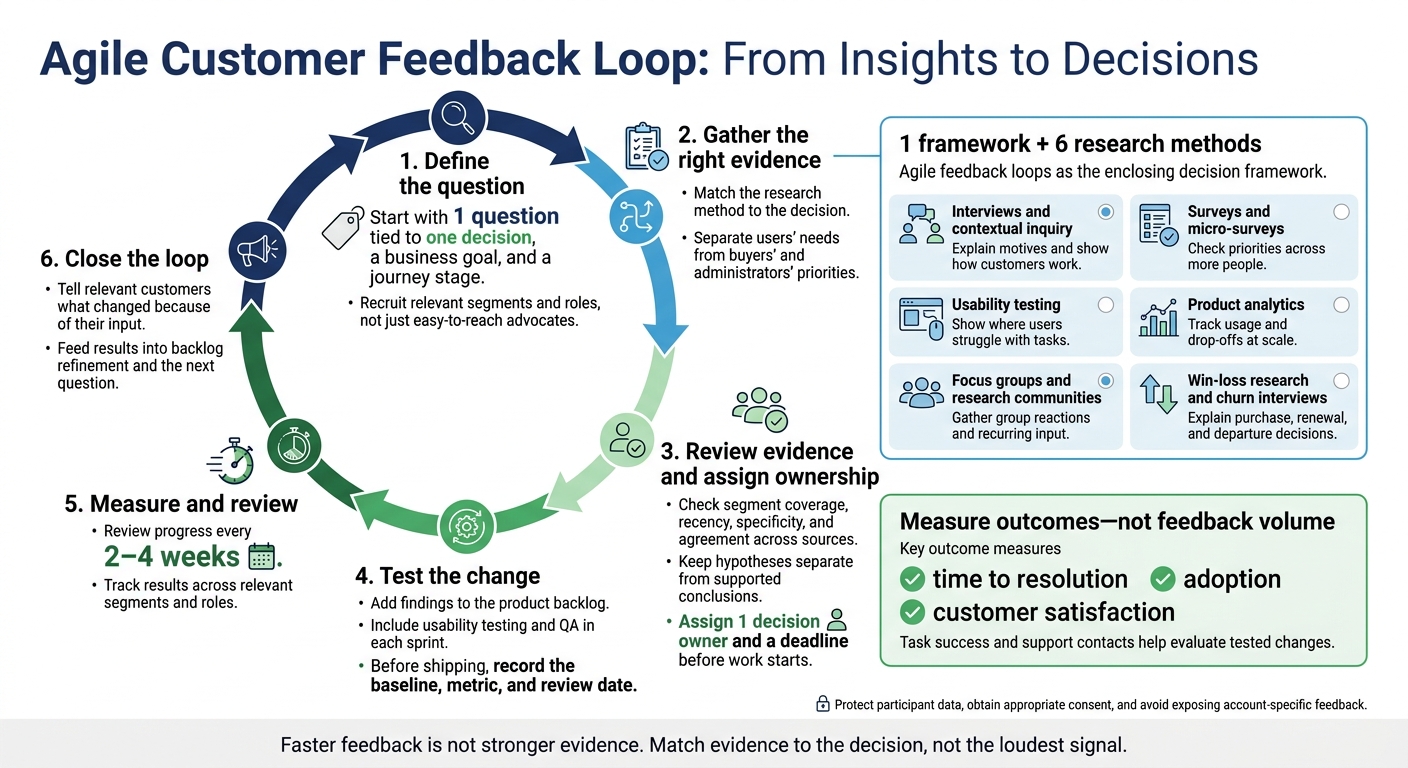
Agile Customer Feedback Loop: From Insights to Decisions
Building Effective Customer Feedback Loops by Sherif Mansour
sbb-itb-01010c0
1. Agile Feedback Loops
Agile feedback loops turn evidence into prioritized work. Add findings to the product backlog and give each change one decision owner.[1] Test the change, measure adoption, and set a response date so feedback leads to action.[2]
Feedback Speed and Cost
Agile sprints usually run 2-4 weeks, giving teams regular review points.[1] Interviews still take customer time, though, and analytics require instrumentation.[2] Keep each cycle small to limit scope and cost.[1]
Fast feedback helps, but the method determines what the team can trust.
Insight Depth and Behavioral Accuracy
Review interview context, survey attitudes, and recorded product behavior together before changing priorities. What customers request and what they actually use may tell different stories.[2] More frequent feedback does not guarantee better insight; the method determines the signal.[2]
Scale and Customer Burden
Surveys reach more customers than one-on-one interviews but provide less depth.[2] Frequent demos also require stakeholders to make time.[1] Use support feedback, surveys, and product usage rather than asking every customer to attend every review.[2]
B2B Buying-Group Fit
B2B feedback loops must account for conflicting input across roles. Segment findings by role so buyers’ requests do not crowd out end users’ and administrators’ needs.[2] Include integration requirements and service-level agreements in those decisions.[1]
A product owner should rank requests by market value and technical feasibility, using evidence from sales, support, and product teams.[1][2]
2. Customer Interviews and Contextual Inquiry
Feedback Speed and Cost
Surveys and analytics flag problems. Interviews help explain why they happen. Plan for 30–60 minutes per interview, plus scheduling and analysis time. Use interviews when a decision requires root-cause detail about legacy systems, integrations, or compliance-heavy workflows.[2][1]
Insight Depth and Behavioral Accuracy
Interviews reveal motivations. Contextual inquiry shows how people work in their actual workflow. Start with interviews to understand the reasons behind a decision, then observe the work to spot pain points and constraints. Contextual inquiry helps explain the why that analytics miss.[2][1] It’s the best next step when observed behavior doesn’t match reported intent.
Scale and Customer Burden
Save live sessions for unresolved, high-impact questions. Use journey mapping to select critical touchpoints rather than holding sessions after every interaction. Fill the gaps with micro-surveys and usage data, and tell participants what changed because of their input.[2]
B2B Buying-Group Fit
Sample customers across roles and lifecycle stages: users and administrators during onboarding, active users during adoption, buyers and decision-makers before renewal, and departing customers after churn.
Match each discussion to the role’s priorities: administration and setup friction, product use and workflow fit, purchase and ROI, or churn and reasons for leaving.[2][1] Use those role-specific findings to shape the next survey or usability test.
3. Surveys and In-Product Micro-Surveys
Feedback Speed and Cost
Use surveys when interviews reveal a question that needs input from more people. Micro-surveys provide real-time, event-triggered feedback and cost less than longer surveys. Broader surveys suit slower roadmapping decisions. In B2B, surveys work best for ranking priorities across many stakeholders, not explaining root causes.[2][1]
Insight Depth and Behavioral Accuracy
Pair quantitative questions with optional open-ended responses to add context and help identify underlying causes. Event-triggered answers can put too much weight on the latest experience, while delayed surveys rely on memory. Compare answers with usage data before prioritizing a request.[2][1]
Scale and Customer Burden
Keep in-product prompts to 1–2 questions, and show them after the action rather than mid-task. For broader surveys, include only questions tied to a decision. Longer questionnaires can reduce response rates. Sample all key segments, not just the most vocal respondents, to avoid skewing results.[2]
B2B Buying-Group Fit
In-product feedback reveals active users’ workflow friction but misses nonusers. Reach buyers, executives, and other stakeholders outside the product through email, interviews, or surveys tied to onboarding or renewal milestones. These channels help you understand buying and renewal priorities. Keep that input separate from active-user feedback so workflow friction doesn't overshadow business priorities.[2]
Use the results to choose which workflows need usability testing next.
4. Usability Testing
Feedback Speed and Cost
Usability testing shows where a workflow breaks after surveys or analytics flag friction. Moderated testing takes more time and money, but helps explain why a task fails. Unmoderated testing scales more easily, but shows what users do better than why they do it.[4] Run usability checks within the sprint so teams can fix issues and retest before the next release.[1]
Insight Depth and Behavioral Accuracy
For complex workflows, watch users complete tasks to check whether reported problems can be reproduced. Pair session notes with analytics to separate usability issues from testing noise.[2] Use this approach when observed task failure matters more than stated preference.
Scale and Customer Burden
Moderated sessions require participants to attend live. Unmoderated testing runs asynchronously and supports more participants. In either case, recruit people who actually do the work.[1][4]
B2B Buying-Group Fit
In B2B, the same task can work differently across accounts. Retest changes with the roles and environments that use the workflow before rolling them out across the customer base. One account’s findings may stem from its integrations or SLAs, rather than a usability issue that affects everyone.[4]
5. Product Analytics and Behavioral Data
After tests or interviews reveal friction, analytics shows whether the same issue occurs at scale. It adds a monitoring layer between research rounds.[1][2]
Feedback Speed and Cost
Instrumented events track clicks, feature use, and drop-offs in key flows in real time. They require upfront setup, but the marginal cost is low after that.[1][2]
Insight Depth and Behavioral Accuracy
Analytics shows where users stop, not why. Use drop-offs to guide the next investigation, not settle the question. Audit anomalies before treating a change in usage as evidence.[1][2]
Scale and Customer Burden
Passive tracking reaches more users, but it still requires transparent notices, clear consent controls, and data-protection controls.[2][4]
B2B Buying-Group Fit
Use the account as the unit of analysis. Aggregate events by account, then segment by role. Connect usage to CRM records and focus on onboarding, adoption, and account health. Assign an owner to investigate declines in core-feature use.[2][4][5]
6. Focus Groups and Research Communities
Use focus groups and research communities when you need input from more people, more often than interviews and surveys alone can support.
Feedback Speed and Cost
One-time focus groups work well for point-in-time concept tests. Research communities provide recurring input between releases, but come with recurring costs.[1][2]
Insight Depth and Behavioral Accuracy
Group discussions reveal how stakeholders negotiate priorities, rather than just stating their individual preferences.[5]
Scale and Customer Burden
Research communities can involve more customers, partners, and suppliers. But repeated requests can tire participants and increase fatigue.[1][2]
B2B Buying-Group Fit
Recruit users, administrators, buyers, and procurement stakeholders through support, win-loss research, and advisory groups.[2][3] Keep purchase questions separate from workflow questions. Then compare themes by role over time so no single buyer speaks for the entire buying group.[2][3][5]
Use recurring themes to choose which objections to examine in win-loss or churn interviews.
7. Win-Loss Research and Churn Interviews
Feedback Speed and Cost
Win-loss interviews explain why recurring objections lead to lost deals or churn. Sprint feedback arrives every 2-4 weeks; win-loss and churn interviews take place at purchase or renewal. Keep these interviews high-value and low-volume, and request them promptly while people can still recall the experience. The goal is to understand why deals are won, lost, renewed, or churned.[1][2]
Insight Depth and Behavioral Accuracy
Interviews surface pricing objections, procurement barriers, competitor pressure, and implementation failures. But treat retrospective accounts as hypotheses to check, not settled facts. Compare pricing claims with contracts, decision timelines with CRM records, and implementation complaints with support history. Use the checked patterns to decide whether product, pricing, or implementation owns the issue.[2]
Scale and Customer Burden
Focus each request on the deal or renewal. Don't ask customers to repeat information already in support logs. Use text analytics to group themes, then check those themes against the source accounts.[2]
B2B Buying-Group Fit
Add recurring findings to the backlog, assign a named owner, and define a measurable test plan. Route pricing or procurement issues to the team that owns them.[1][2][4]
Putting Methods Into a Continuous Feedback Loop
Connect the methods above through one repeatable decision cycle.
Define the Question and Recruit Stakeholders
Start with one decision tied to a business goal and a journey stage, rather than a broad request for feedback. Focus the question on the stage that matters most. Recruit people across relevant segments and roles tied to the decision, not just the easiest-to-reach advocates. Limit repeat requests to reduce customer fatigue and keep the sample more representative.[1][2][5]
Use discovery methods, such as interviews and win/loss research, to define the problem. Then use delivery methods, such as micro-surveys, usability tests, and analytics, to validate the fix.[1][2]
Once the question is clear, review only the evidence needed to decide.
Review Evidence and Assign a Decision Owner
Bring the teams that own the decision into the review. Check segment coverage, recency, specificity, agreement across sources, and whether the findings support action. Document conflicting findings across buying-group roles, and keep hypotheses separate from supported conclusions. Assign one decision owner and a deadline before work starts.[2]
Move the decision into sprint execution, then measure the result.
Test Changes and Measure Results
Use each sprint to test, measure, and refine the decision. Include usability testing and QA in every sprint, and feed the results into backlog refinement. Use sprint reviews or demos as the decision gate for shippable changes. Track task success, adoption, and support contacts across relevant segments and roles.[1][2][3]
Protect participants throughout the cycle. Explain how data will be collected and reused, obtain appropriate consent, collect only necessary data, and restrict access to account-specific feedback. When appropriate, share decisions with participating customers without exposing other accounts. Treat renewal and expansion as lagging signals, not proof of causation. Attribution can organize touchpoints, but it cannot prove cause.[2][4]
Strengths, Limits, and Trade-Offs
Choose the method based on the decision and the trade-offs you can accept. Agile feedback loops structure research; they do not replace it. Their value depends on the methods you combine, the scope of the question, and access to stakeholders.
| Approach | Decision Fit | Best Signal | Main Advantage | Key Weakness | Speed | Scale |
|---|---|---|---|---|---|---|
| Agile feedback loops | Backlog refinement | Fast directional signal | Links evidence to delivery | Easy to overreact without clear metrics | Collection can be immediate; delivery follows sprints | Method-dependent |
| Interviews and contextual inquiry | Discovery | Deep understanding of why people behave as they do | Depth and nuance | Low coverage | Slow; usually weeks | Low |
| Surveys and micro-surveys | Validation | Broad trend signal | Broad reach | Limited depth | Fast for micro-surveys | High |
| Usability testing | Workflow refinement | Observed task failure | Catches issues early | Small sample | Moderate; often days | Low to medium |
| Product analytics and behavioral data | Monitoring | Observed usage data | High-volume behavioral signal | Shows behavior, not motive | Often near real-time | Very high |
| Focus groups and research communities | Ideation | Group reaction | Shared discussion | Groupthink risk | Moderate | Low to medium |
| Win-loss research and churn interviews | Revenue retention and roadmap priorities | Deal outcomes and churn causes | Links findings to commercial decisions | Lagging timing | Purchase- or renewal-dependent | Recruitment-dependent |
No single method fits every decision. Faster feedback is not stronger evidence. The trade-offs are depth versus coverage and speed versus confidence.
In B2B, the easiest person to reach isn't always the right person to hear from. Buyers, administrators, and former customers can be underrepresented. Analytics avoids self-report bias, but it measures only tracked behavior. Surveys reach more people, but that doesn't guarantee a representative sample.
Let those limits guide your next evidence source. Agile feedback loops lose value when every comment resets priorities or success metrics stay vague. Match evidence to the decision, not the loudest signal.
Conclusion: Match Evidence to Decisions
After comparing methods, use the loop to turn signals into decisions. Analytics finds friction; interviews and usability testing explain it; surveys and segmented data show how common it is; win-loss research adds buying and renewal context.[2]
Assign 1 decision owner and include the same buying-group segments in each review. Review progress every 2 to 4 weeks to keep decisions tied to current priorities.[1][2]
Before shipping the change, record the baseline, metric, and review date. Track time to resolution, adoption, and customer satisfaction - not feedback volume. Then tell the relevant customers how you resolved the issue.[2]
FAQs
How do I prioritize conflicting B2B feedback?
Use a structured, objective process: store all feedback in one repository and score it against business objectives, revenue potential, and sprint goals. If the volume becomes too much to review, use AI-powered analytics to identify key metrics and findings the team can act on.
Bring customer-facing and Agile teams together to set priorities that reflect both client needs and business requirements.
How much evidence is enough to act?
Evidence is enough to act on when customer signals point to clear outcomes, not just anecdotes. In B2B agile loops, pair stakeholder interviews with product usage and sentiment data. Act when the analysis shows consistent patterns and measurable impact, checked through before-and-after comparisons or ROI tracking [1].
To build confidence, run controlled experiments with defined hypotheses, agreed-upon success metrics, and statistical significance thresholds [2][3].
How can I tell whether a change caused improvement?
Focus on outcomes, not just outputs. Set success metrics and a hypothesis before making a change, then compare performance before and after. Track customer retention, Net Promoter Score (NPS), feature adoption, or fewer support tickets.
Use A/B testing or Bayesian inference to assess whether differences are statistically meaningful or just random noise. Document your methods and results so teams across your organization can learn from each test.